10
Static Build Pipelines
| 10.1 Mill Build Pipelines | 183 |
| 10.2 Mill Modules | 187 |
| 10.3 Revisiting our Static Site Script | 191 |
| 10.4 Conversion to a Mill Build Pipeline | 191 |
| 10.5 Extending our Static Site Pipeline | 195 |
import mill.*
def srcs = Task.Source("src")
def concat = Task:
os.write(Task.dest / "concat.txt", os.list(srcs().path).map(os.read(_)))
PathRef(Task.dest / "concat.txt")
Snippet 10.1: the definition of a simple Mill build pipeline
Build pipelines are a common pattern, where you have files and assets you want to process but want to do so efficiently, incrementally, and in parallel. This usually means only re-processing files when they change, and re-using the already processed assets as much as possible. Whether you are compiling Scala, minifying Javascript, or compressing tarballs, many of these file-processing workflows can be slow. Parallelizing these workflows and avoiding unnecessary work can greatly speed up your development cycle.
This chapter will walk through how to use the Mill build tool to set up these build pipelines, and demonstrate the advantages of a build pipeline over a naive build script. We will take the simple static site generator we wrote in Chapter 9: Self-Contained Scala Scripts and convert it into an efficient build pipeline that can incrementally update the static site as you make changes to the sources. We will be using the Mill build tool in several of the projects later in the book, starting with Chapter 14: Simple Web and API Servers.
10.1 Mill Build Pipelines
10.1.1 Defining a Build Pipeline
To introduce the core concepts in Mill, we'll first look at a trivial Mill build that takes files in a source folder and concatenates them together:
build.mill10.2.scalaimportmill.*defsrcs=Task.Source("src")defconcat=Task:os.write(Task.dest/"concat.txt",os.list(srcs().path).map(os.read(_)))PathRef(Task.dest/"concat.txt")
You can read this snippet as follows:
-
This
build.millfile defines one source foldersrcsand one downstream taskconcat. -
We make use of
srcsin the body ofconcatvia thesrcs()syntax, which tells Mill thatconcatdepends onsrcsand makes the value ofsrcsavailable toconcat. -
Inside
concat, we list thesrc/folder, read all the files, and concatenate their contents into a single fileconcat.txt. -
The final
concat.txtfile is wrapped in aPathRef, which tells Mill that we care not just about the name of the file, but also its contents.
This results in the following simple dependency graph
10.1.1.1 Tasks
The Mill build tool is built around the concept of tasks. Tasks are the nodes within the build graph, and represent individual steps that make up your build pipeline.
Every task you define via the def foo = Task: syntax gives you the
following things for free:
- It is made available for you to run from the command line via
./mill foo - The return value of the
Task:block is made printable via./mill show foo - It automatically evaluates any necessary upstream tasks, before its own
Task:block evaluates - It automatically caches the computed result on disk, and only re-evaluates when its inputs change
In general, this helps automate a lot of the tedious book-keeping that is normally needed when writing incremental build scripts. Rather than spending your time writing command-line argument parsers or hand-rolling a caching and invalidation strategy, Mill handles all that for you and allows you to focus on the logical structure of your build.
10.1.1.2 Task Destination Folders
Note that concat.txt is created within the concat task's
destination folder Task.dest. Every task has its own destination folder, named
after the fully-qualified path to the task (in this case, out/concat.dest/).
This means that we do not have to worry about concat's files being
accidentally over-written by other tasks.
In general, any Mill task should only create and modify files within its own
Task.dest, to avoid collisions and interference with other tasks. The contents
of Task.dest are deleted each time before the task evaluates,
(and only evaluates when changes are detected), ensuring that the
task always starts each evaluation with a fresh destination folder and isn't
affected by the outcome of previous evaluations.
10.1.2 Using Your Build Pipeline
Assuming you already have a ./mill script set up, we can then create a src/ folder
with some files inside:
$ mkdir src

$ echo "hear me moo" > src/iamcow.txt

$ echo "hello world" > src/hello.txt
10.3.bash
We can now build the concat task, ask Mill to print the path to its
output file, and inspect its contents:
$ ./mill concat

$ ./mill show concat
"ref:fd0201e7:/Users/lihaoyi/test/out/concat.dest/concat.txt"

$ cat out/concat.dest/concat.txt
hello world
hear me moo
10.4.bash
Mill re-uses output files whenever possible: calling ./mill concat repeatedly returns the
already generated concat.txt file. However, if we change the contents of the
srcs by adding a new file to the folder, Mill automatically re-builds
concat.txt to take the new input into account:
$ echo "twice as much as you" > src/iweigh.txt

$ ./mill concat

$ cat out/concat.dest/concat.txt
hello world
hear me moo
twice as much as you
10.5.scala10.1.3 Non-linear Build Pipelines
While our build pipeline above only has one set of sources and one task, we
can also define more complex builds. For example, here is an example build with
2 source folders (src/ and resources/) and 3 tasks (concat, compress
and zipped):
build.mill10.6.scalaimportmill.*defsrcs=Task.Source("src")+defresources=Task.Source("resources")defconcat=Task:...+defcompress=Task:+forp<-os.list(resources().path)do+valcopied=Task.dest/p.relativeTo(resources().path)+os.copy(p,copied)+os.call(cmd=("gzip",copied))++PathRef(Task.dest)++defzipped=Task:+valtemp=Task.dest/"temp"+os.makeDir(temp)+os.copy(concat().path,temp/"concat.txt")++forp<-os.list(compress().path)do+os.copy(p,temp/p.relativeTo(compress().path))++os.call(cmd=("zip","-r",Task.dest/"out.zip","."),cwd=temp)+PathRef(Task.dest/"out.zip")+
In addition to concatenating files, we also gzip compress the contents of our
resources/ folder. We then take the concatenated sources and compressed
resources and zip them all up into a final out.zip file:
Given files in both srcs/ and resources/:
| |
We can run ./mill zipped and see the expected concat.txt and *.gz files in
the output out.zip:
$ ./mill show zipped
"ref:a3771625:/Users/lihaoyi/test/out/zipped.dest/out.zip"

$ unzip -l out/zipped.dest/out.zip
Archive:  out/zipped.dest/out.zip
  Length      Date    Time    Name
---------  ---------- -----   ----
       35  11-30-2019 13:10   foo.md.gz
       45  11-30-2019 13:10   concat.txt
       40  11-30-2019 13:10   thing.py.gz
10.9.bash
10.1.4 Incremental Re-Computation
As shown earlier, out.zip is re-used as long as none of the inputs (src/ and
resources/) change. However, because our pipeline has two branches, the
concat and compress tasks are independent: concat is only re-generated
if the src/ folder changes:
And the compress task is only re-generated if the resources/ folder
changes:
Since compress and concat do not depend on each other, Mill will
automatically run them in parallel.
While in these examples our tasks all returned PathRefs to files or
folders, you can also define tasks that return any data type
compatible with the uPickle library we went through in Chapter 8: JSON and Binary Data Serialization.
10.2 Mill Modules
Mill also supports the concept of modules. You can use modules to define repetitive sets of build tasks.
It is very common for certain sets of tasks to be duplicated within your
build: perhaps for every folder of source files, you want to compile them, lint
them, package them, test them, and publish them. By defining a trait that
extends Module, you can apply the same set of tasks to different folders on
disk, making it easy to manage the build for larger and more complex projects.
Here we are taking the set of srcs/resources and
concat/compress/zipped tasks we defined earlier and wrapping them in a
trait FooModule so they can be re-used:
build.mill10.10.scalaimportmill.*+traitFooModuleextendsModule:defsrcs=Task.Source("src")defresources=Task.Source("resources")defconcat=Task:...defcompress=Task:...defzipped=Task:...++objectbarextendsFooModule+objectquxextendsFooModule
object bar and object qux extend trait FooModule, and have source paths
(accessible via the inherited moduleDir property) of bar/ and qux/ respectively.
The srcs and resources definitions above thus point to the following folders:
bar/src/bar/resources/qux/src/qux/resources/
You can ask Mill to list out the possible tasks for you to build via
./mill resolve __ (that's two _s in a row):
$ ./mill resolve __
bar.compress
bar.concat
bar.resources
bar.srcs
bar.zipped
qux.compress
qux.concat
qux.resources
qux.srcs
qux.zipped
10.11.bash
Any of the tasks above can be built from the command line, e.g. via
$ mkdir -p bar/src bar/resources

$ echo "Hello" > bar/src/hello.txt; echo "World" > bar/src/world.txt

$ ./mill show bar.zipped
"ref:efdf1f3c:/Users/lihaoyi/test/out/bar/zipped.dest/out.zip"

$ unzip out/bar/zipped.dest/out.zip
Archive:  out/bar/zipped.dest/out.zip
 extracting: concat.txt

$ cat concat.txt
Hello
World
10.12.bash10.2.1 Nested Modules
Modules can also be nested to form arbitrary hierarchies:
build.mill10.13.scalaimportmill.*traitFooModuleextendsModule:defsrcs=Task.Source("src")defconcat=Task:os.write(Task.dest/"concat.txt",os.list(srcs().path).map(os.read(_)))PathRef(Task.dest/"concat.txt")objectbarextendsFooModule:objectinner1extendsFooModuleobjectinner2extendsFooModuleobjectwrapperextendsModule:objectquxextendsFooModule
Here we have four FooModules: bar, bar.inner1, bar.inner2, and
wrapper.qux. This exposes the following source folders and tasks:
|
Source Folders
|
Tasks
|
Note that wrapper itself is a Module but not a FooModule, and thus does
not itself define a wrapper/src/ source folder or a wrapper.concat task.
In general, every object in your module hierarchy needs to inherit from
Module, although you can inherit from a custom subtype of FooModule if you
want them to have some common tasks already defined.
The moduleDir made available within each module differs: while in the
top-level build pipelines we saw earlier moduleDir was always equal to
os.pwd, within a module the moduleDir reflects the module path, e.g.
the moduleDir of bar is bar/, the moduleDir of wrapper.qux
is wrapper/qux/, and so on.
10.2.2 Cross Modules
The last basic concept we will look at is cross modules. These are most useful when the number or layout of modules in your build isn't fixed, but can vary based on e.g. the files on the filesystem:
build.mill10.14.scalaimportmill.*importmillBuildCtx.api.valitems=BuildCtx.watchValue{os.list(BuildCtx.workspaceRoot/"foo").map(_.last)}objectfooextendsCross[FooModule](items)traitFooModuleextendsCross.Module[String]:defmoduleDir=super.moduleDir/crossValuedefsrcs=Task.Source("src")defconcat=Task:os.write(Task.dest/"concat.txt",os.list(srcs().path).map(os.read(_)))PathRef(Task.dest/"concat.txt")
Here, we define a cross module foo that takes a set of items found by
listing the sub-folders in foo/. This set of items is dynamic, and can
change if the folders on disk change, without needing to update the build.mill
file for every change.
Note the BuildCtx.watchValue call; this is necessary to tell Mill to take note
in case the number or layout of modules within the foo/ folder changes.
Without it, we would need to restart the Mill process using ./mill shutdown to
pick up changes in how many entries the cross-module contains.
The Cross class that foo inherits is a Mill builtin, that automatically
generates a set of Mill modules corresponding to the items we passed in.
10.2.3 Modules Based on Folder Layout
Typically, a cross module has the same moduleDir as an ordinary module, but in the example above
it is overwritten to consider the crossValue as part of the path, giving each module
a unique srcs directory.
As written, given a filesystem layout on the left, it results in the source
folders and concat tasks on the right:
|
sources
tasks |
If we then add a new source folder via mkdir -p, Mill picks up the additional
module and concat target:
$ mkdir -p foo/thing/src

$ ./mill resolve __.concat
foo.bar.concat
foo.qux.concat
foo.thing.concat
10.17.bash10.3 Revisiting our Static Site Script
We have now gone through the basics of how to use Mill to define simple asset
pipelines to incrementally perform operations on a small set of files. Next, we
will return to the Blog.scala static site script we wrote in Chapter 9, and
see how we can use these techniques to make it incremental: to only re-build the
pages of the static site whose inputs changed since the last time they were
built.
While Blog.scala works fine in small cases, there is one big limitation: the
entire script runs every time. Even if you only change one blog post's .md
file, every file will need to be re-processed. This is wasteful, and can be slow
as the number of blog posts grows. On a large blog, re-processing every post can
take upwards of 20-30 seconds: a long time to wait every time you tweak some
wording!
It is possible to manually keep track of which .md file was converted into
which .html file, and thus avoid re-processing .md files unnecessarily.
However, this kind of book-keeping is tedious and easy to get wrong. Luckily,
this is the kind of book-keeping and incremental re-processing that Mill is good
at!
10.4 Conversion to a Mill Build Pipeline
We will now walk through a step by step conversion of this Blog.scala script file
into a Mill build.mill. First, we must rename Blog.scala into build.mill to
convert it into a Mill build pipeline and add the import mill.* declaration:
Blog.scala -> build.mill10.18.scala+importmill.*importscalatagsText..all.*
Second, since we can rely on Mill invalidating and deleting stale files and
folders as they fall out of date, we no longer need the os.remove.all and
os.makeDir.all calls:
build.mill10.19.scala-os.remove.all(os.pwd/"_blog")-os.makeDir.all(os.pwd/"_blog/post")
We will also remove the def main method and publishing code for now. mill build pipelines
use a different syntax for taking command-line arguments than Scala files do,
and porting this functionality to our Mill build pipeline is
left as an exercise at the end of the chapter.
build.mill10.20.scala-defmain(targetGitRepo:String="")=...--iftargetGitRepo!=""then-os.call(cmd=("git","init"),cwd=os.pwd/"_blog")-os.call(cmd=("git","add","-A"),cwd=os.pwd/"_blog")-os.call(cmd=("git","commit","-am","."),cwd=os.pwd/"_blog")-os.call(cmd=("git","push",targetGitRepo,"head","-f"),cwd=os.pwd/"_blog")
Lastly, we need to wrap the computation of postInfo inside a mill.api.BuildCtx.watchValue
call, to ensure that changes to postInfo are detected by ./mill --watch:
build.mill10.21.scala-valpostInfo=os-.list(os.pwd/"post")-.map:p=>-vals"$prefix-$suffix.md"=p.last-(prefix,suffix,p)-.sortBy(_(0).toInt)+importmillBuildCtx.api.+valpostInfo=BuildCtx.watchValue:+os.list(BuildCtx.workspaceRoot/"post")+.map:p=>+vals"$prefix-$suffix.md"=p.last+(prefix,suffix,p)+.sortBy(_(0).toInt)
Note also how we replaced os.pwd with BuildCtx.workspaceRoot. That is necessary because in Mill
os.pwd may not always point at the root folder of your project.
10.4.1 For-Loop to Cross Modules
Third, we convert the for-loop that we previously used to iterate over the
files in the postInfo list, and convert it into a cross module. That will
allow every blog post's .md file to be processed, invalidated, and
re-processed independently only if the original .md file changes:
build.mill10.22.scala-for(_,suffix,path)<-postInfodo+objectpostextendsCross[PostModule](postInfo.map(_(0)))+traitPostModuleextendsCross.Module[String]:+defnumber=crossValue+valSome((_,suffix,markdownPath))=postInfo.find(_(0)==number)+defsrcPath=Task.Source(markdownPath)+defrender=Task:valparser=org.commonmark.parser.Parser.builder().build()-valdocument=parser.parse(os.read(srcPath))+valdocument=parser.parse(os.read(srcPath().path))valrenderer=org.commonmark.renderer.html.HtmlRenderer.builder().build()valoutput=renderer.render(document)os.write(-os.pwd/"_blog/post"/mdNameToHtml(suffix),+Task.dest/mdNameToHtml(suffix),doctype("html")(...))+PathRef(Task.dest/mdNameToHtml(suffix))
Note how the items in the Cross[](...) declaration are the numbers corresponding
to each post in our postInfo list. For each item, we define a source path
which is the source file itself, as well as a def render task which is a
PathRef to the generated HTML. In the conversion from a hardcoded script to a
Mill build pipeline, all the hardcoded references writing files os.pwd / "_blog"
have been replaced by the Task.dest of each task.
10.4.2 An Index Page Task
Fourth, we wrap the generation of the index.html file into a task as well:
build.mill10.23.scala+deflinks=Task.Input{postInfo.map(_(1))}++defindex=Task:os.write(-os.pwd/"_blog/index.html",+Task.dest/"index.html",doctype("html")(html(head(bootstrapCss),body(h1("Blog"),-for(_,suffix,_)<-postInfodo+forsuffix<-links()doyieldh2(a(href:=("post/"+mdNameToHtml(suffix)))(suffix))))))+PathRef(Task.dest/"index.html")
Note that we need to define a def links task that is a Task.Input: this tells
Mill that the contents of the postInfo.map expression may change (since it
depends on the files present on disk) and to make sure to re-evaluate it every
time to check for changes. Again, the hardcoded references to os.pwd / "_blog"
have been replaced by the Task.dest of the individual task.
10.4.3 Arranging Files For Distribution
Lastly, we need to aggregate all our individual posts and the index.html file
into a single task, which we will call dist (short for "distribution"):
build.mill10.24.scala+valposts=Task.sequence(postInfo.map(_(0)).map(post(_).render))++defdist=Task:+forpost<-posts()do+os.copy(post.path,Task.dest/"post"/post.path.last,createFolders=true)++os.copy(index().path,Task.dest/"index.html")++PathRef(Task.dest)
This is necessary because while previously we created the HTML files for the
individual posts and index "in place", now they are each created in separate
Task.dest folders assigned by Mill so they can be separately invalidated and
re-generated. Thus we need to copy them all into a single folder that we can
open locally in the browser or upload to a static site host.
Note that we need to use the helper method Task.sequence to turn the
Seq[T[PathRef]] into a T[Seq[PathRef]] for us to use in def dist.
10.4.4 Using Your Static Build Pipeline
We now have a static site pipeline with the following shape:
We can now take the same set of posts we used earlier, and build them into a
static website using ./mill. Note that the output is now in the
out/dist.dest/ folder, which is the Task.dest folder for the dist task.
$ find post -type f
post/1 - My First Post.md
post/3 - My Third Post.md
post/2 - My Second Post.md

$ ./mill show dist
"ref:b33a3c95:/Users/lihaoyi/Github/blog/out/dist.dest"

$ find out/dist.dest -type f
out/dist.dest/index.html
out/dist.dest/post/my-first-post.html
out/dist.dest/post/my-second-post.html
out/dist.dest/post/my-third-post.html
10.25.bash
We can then open the index.html in our browser to view the blog. Every time
you run ./mill dist, Mill will only re-process the blog posts that have
changed since you last ran it. You can also use ./mill --watch dist or ./mill -w dist to have Mill watch the filesystem and automatically re-process the
files every time they change.
10.5 Extending our Static Site Pipeline
Now that we've defined a simple pipeline, let's consider two extensions:
-
Download the
bootstrap.cssfile at build time and bundle it with the static site, to avoid a dependency on the third party hosting service -
Extract a preview of each blog post and include it on the home page
10.5.1 Bundling Bootstrap
Bundling bootstrap is simple. We define a bootstrap task to download the file
and include it in our dist:
build.mill10.26.scala-valbootstrapCss=link(-rel:="stylesheet",-href:="https://stackpath.bootstrapcdn.com/bootstrap/4.5.0/css/bootstrap.css"-)+defbootstrap=Task:+os.write(+Task.dest/"bootstrap.css",+requests.get(+"https://stackpath.bootstrapcdn.com/bootstrap/4.5.0/css/bootstrap.css"+)+)+PathRef(Task.dest/"bootstrap.css")
build.mill10.27.scaladefdist=Task:forpost<-posts()doos.copy(post.path,Task.dest/"post"/post.path.last,createFolders=true)os.copy(index().path,Task.dest/"index.html")+os.copy(bootstrap().path,Task.dest/"bootstrap.css")PathRef(Task.dest)
And then update our two bootstrapCss links to use a local URL:
build.mill10.28.scala-head(bootstrapCss),+head(link(rel:="stylesheet",href:="../bootstrap.css")),
build.mill10.29.scala-head(bootstrapCss),+head(link(rel:="stylesheet",href:="bootstrap.css")),
Now, when you run ./mill dist, you can see that the bootstrap.css file is
downloaded and bundled with your dist folder, and we can see in the browser
that we are now using a locally-bundled version of Bootstrap:
$ find out/dist.dest -type f
out/dist.dest/bootstrap.css
out/dist.dest/index.html
out/dist.dest/post/my-first-post.html
out/dist.dest/post/my-second-post.html
out/dist.dest/post/my-third-post.html
10.30.bash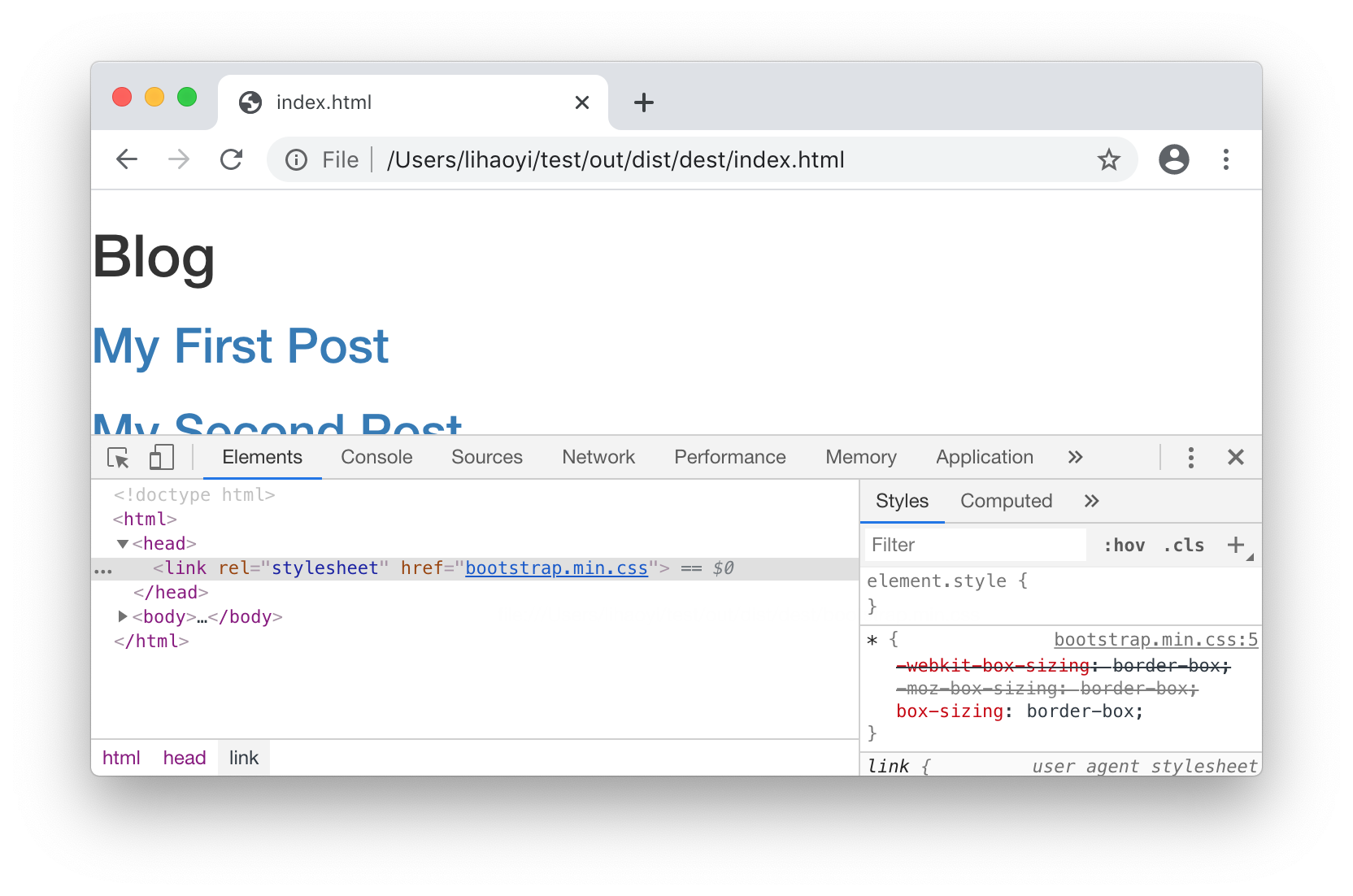
Since it does not depend on any Task.Source, the bootstrap = Task: task never
invalidates. This is usually what you want when depending on a stable URL like
bootstrap/4.5.0. If you are depending on something unstable that needs to be
regenerated every build, define it as a Task.Input: task.
We now have the following build pipeline, with the additional bootstrap step:
10.5.2 Post Previews
To render a paragraph preview of each blog post in the index.html page, the
first step is to generate such a preview for each PostModule. We will simply
take everything before the first empty line in the Markdown file, treat that as
the "first paragraph" of the post, and feed it through our Markdown parser:
build.mill10.31.scalatraitPostModuleextendsCross.Module[String]:defnumber=crossValuevalSome((_,suffix,path))=postInfo.find(_(0)==number)defpath=Task.Source(markdownPath)+defpreview=Task:+valparser=org.commonmark.parser.Parser.builder().build()+valfirstPara=os.read.lines(path().path).takeWhile(_.nonEmpty)+valdocument=parser.parse(firstPara.mkString("\n"))+valrenderer=org.commonmark.renderer.html.HtmlRenderer.builder().build()+valoutput=renderer.render(document)+outputdefrender=Task:
Here we are leaving the preview as output: String rather than writing it to a
file and using a PathRef.
Next, we need to aggregate the previews the same way we aggregated the
renders earlier:
build.mill10.32.scaladeflinks=Task.Input{postInfo.map(_(1))}+valpreviews=Task.sequence(postInfo.map(_(0)).map(post(_).preview))defindex=Task:
Lastly, in dist, zip the preview together with the postInfo in order to
render them:
build.mill10.33.scala-forsuffix<-links()-yieldh2(a(href:=("post/"+mdNameToHtml(suffix)))(suffix))+for(suffix,preview)<-links().zip(previews())+yieldfrag(+h2(a(href:=("post/"+mdNameToHtml(suffix)))(suffix)),+raw(preview)// include markdown-generated HTML "raw" without HTML-escaping+)
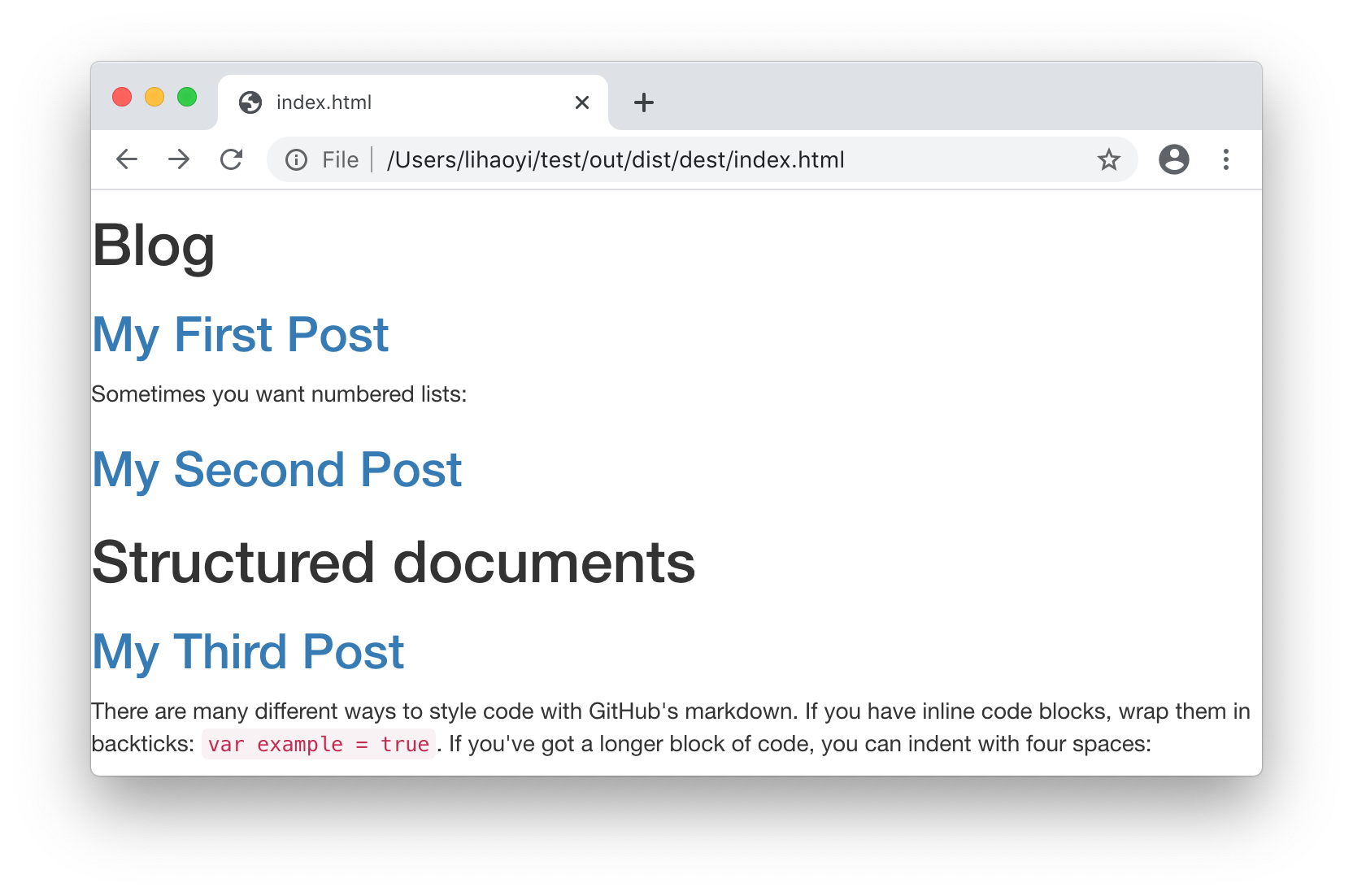
Now we get pretty previews in index.html!
The build pipeline now looks like:
Note how we now have both post.n.preview and post.n.render tasks, with
the preview tasks being used in index to generate the home page and the
render tasks only being used in the final dist. As we saw earlier, any
change to a file only results in that file's downstream tasks being
re-generated. This saves time over naively re-generating the entire static site
from scratch. It should also be clear the value that Mill
Modules (10.2) bring, in allowing repetitive sets of tasks like
preview and render to be defined for all blog posts without boilerplate.
10.5.3 A Complete Static Site Pipeline
build.mill10.34.scala//| mvnDeps://| - com.lihaoyi::scalatags:0.13.1//| - org.commonmark:commonmark:0.26.0importmill.*importmillBuildCtx.api.importscalatagsText..all.*defmdNameToHtml(name:String)=name.replace(" ","-").toLowerCase+".html"valpostInfo=BuildCtx.watchValue:os.list(BuildCtx.workspaceRoot/"post").map:p=>vals"$prefix-$suffix.md"=p.last(prefix,suffix,p).sortBy(_(0).toInt)defbootstrap=Task:os.write(Task.dest/"bootstrap.css",requests.get("https://stackpath.bootstrapcdn.com/bootstrap/4.5.0/css/bootstrap.css"))PathRef(Task.dest/"bootstrap.css")defrenderMarkdown(s:String)=valparser=org.commonmark.parser.Parser.builder().build()valdocument=parser.parse(s)valrenderer=org.commonmark.renderer.html.HtmlRenderer.builder().build()renderer.render(document)defrenderHtmlPage(dest:os.Path,bootstrapUrl:String,contents:Frag*)=os.write(dest,doctype("html")(html(head(link(rel:="stylesheet",href:=bootstrapUrl)),body(contents))))PathRef(dest)objectpostextendsCross[PostModule](postInfo.map(_(0)))traitPostModuleextendsCross.Module[String]:defnumber=crossValuevalSome((_,suffix,markdownPath))=postInfo.find(_(0)==number)defpath=Task.Source(markdownPath)defpreview=Task:renderMarkdown(os.read.lines(path().path).takeWhile(_.nonEmpty).mkString("\n"))defrender=Task:renderHtmlPage(Task.dest/mdNameToHtml(suffix),"../bootstrap.css",h1(a(href:="../index.html")("Blog")," / ",suffix),raw(renderMarkdown(os.read(path().path))))deflinks=Task.Input{postInfo.map(_(1))}valposts=Task.sequence(postInfo.map(_(0)).map(post(_).render))valpreviews=Task.sequence(postInfo.map(_(0)).map(post(_).preview))defindex=Task:renderHtmlPage(Task.dest/"index.html","bootstrap.css",h1("Blog"),for(suffix,preview)<-links().zip(previews())yieldfrag(h2(a(href:=("post/"+mdNameToHtml(suffix)))(suffix)),raw(preview)// include markdown-generated HTML "raw" without HTML-escaping))defdist=Task:forpost<-posts()doos.copy(post.path,Task.dest/"post"/post.path.last,createFolders=true)os.copy(index().path,Task.dest/"index.html")os.copy(bootstrap().path,Task.dest/"bootstrap.css")PathRef(Task.dest)
10.6 Conclusion
In this chapter, we have learned how to define simple incremental build pipelines using Mill. We then took the script in Chapter 9: Self-Contained Scala Scripts and converted it into a Mill build pipeline. Unlike a naive script, this pipeline allows fast incremental updates whenever the underlying sources change, along with easy parallelization, all in less than 90 lines of code. We have also seen how to extend the Mill build pipeline, adding additional build steps to do things like bundling CSS files or showing post previews, all while preserving the efficient incremental nature of the build pipeline.
Mill is a general-purpose build tool and can be used to create general-purpose build pipelines for all sorts of data. In later chapters we will be using the Mill build tool to compile Java and Scala source code into executables. For a more thorough reference, you can browse the Mill online documentation:
This chapter marks the end of the second section of this book: Part II Local Development. You should hopefully be confident using the Scala programming language to perform general housekeeping tasks on a single machine, manipulating files, subprocesses, and structured data to accomplish your goals. The next section of this book, Part III Web Services, will explore using Scala in a networked, distributed world: where your fundamental tools are not files and folders, but HTTP APIs, servers, and databases.
Exercise: Mill tasks can take also command line arguments, by defining
def name(...) = Task.Command: methods. Similar to @main methods in Scala
files, the arguments to name are taken from the command line. Define a Task.Command in
our build.mill that allows the user to specify a remote git repository from
the command line, and uses os.call operations to push the static site to
that repository.
Exercise: You can use the Puppeteer Javascript library to convert HTML web pages into
PDFs, e.g. for printing or publishing as a book. Integrate Puppeteer into our
static blog, using the subprocess techniques we learned in
Chapter 7: Files and Subprocesses, to add a ./mill pdfs task that creates
a PDF version of each of our blog posts.
Puppeteer can be installed via npm, and its docs can be found at:
The following script can be run via node, assuming you have the puppeteer
library installed via NPM, and takes a src HTML file path and dest output
PDF path as command line arguments to perform the conversion from HTML to PDF:
const puppeteer = require('puppeteer');
const [src, dest] = process.argv.slice(2)
puppeteer.launch().then(async function(browser){
const page = await browser.newPage();
await page.goto("file://" + src, {waitUntil: 'load'});
await page.pdf({path: dest, format: 'A4'});
process.exit(0)
})
Exercise: The Apache PDFBox library is a convenient way to manipulate PDFs from Java or
Scala code, and can easily be added as a dependency with --import for use with Mill REPL
or scripts via the coordinates org.apache.pdfbox:pdfbox:2.0.18. Add a new task to our
build pipeline that uses the class
org.apache.pdfbox.multipdf.PDFMergerUtility from PDFBox to concatenate the
PDFs for each individual blog post into one long multi-page PDF that contains
all of the blog posts one after another.