6
Implementing Algorithms in Scala
| 6.1 Merge Sort | 111 |
| 6.2 Prefix Tries | 114 |
| 6.3 Breadth First Search | 122 |
| 6.4 Shortest Paths | 124 |
def breadthFirstSearch[T](start: T, graph: Map[T, Seq[T]]): Set[T] =
val seen = collection.mutable.Set(start)
val queue = collection.mutable.ArrayDeque(start)
while queue.nonEmpty do
val current = queue.removeHead()
for next <- graph(current) if !seen.contains(next) do
seen.add(next)
queue.append(next)
seen.toSet
Snippet 6.1: a simple breadth-first-search algorithm we will implement using Scala in this chapter
In this chapter, we will walk you through the implementation of a number of common algorithms using the Scala programming language. These algorithms are commonly taught in schools and tested at professional job interviews, so you have likely seen them before.
By implementing them in Scala, we aim to get you more familiar with using the Scala programming language to solve small problems in isolation. We will also see how some of the unique language features we saw in Chapter 5: Notable Scala Features can be applied to simplify the implementation of these well-known algorithms. This will prepare us for subsequent chapters which will expand in scope to include many different kinds of systems, APIs, tools and techniques.
6.1 Merge Sort
An Array is the simplest of data structures: a fixed length linear sequence of values. One of the most common things you do with arrays is to sort them and search them. Merge Sort is one way to sort them, with a balance of speed and simplicity. The key steps in a merge sort are as follows:
- Take an unsorted array of items
- If the array has a single item, it is already sorted
- Otherwise, split the array in half
- Separately merge sort the two halves of the array
- Merge the two sorted halves into one combined sorted array
These steps are recursive: to sort each array with more than one item, we have
to split it in half and sort the halves. We can visualize this as follows
starting with the unsorted Array(4, 0, 1, 5, 3, 2):
Because the array we are working with gets halved every split, there can only be
O(log n) levels of splitting for an array of size n. Each level takes
O(n) time to split and merge the arrays, resulting in a final algorithm which
is of complexity O(n log n). These steps translate into the following code:
MergeSort.scala6.2.scaladefmergeSort(items:Array[Int]):Array[Int]=ifitems.length<=1thenitemselseval(left,right)=items.splitAt(items.length/2)val(sortedLeft,sortedRight)=(mergeSort(left),mergeSort(right))
The translation is relatively straightforward: we define a mergeSort function
that takes in an Array (for now hardcoded to elements of type Int). If it
has length 1, we return it. Otherwise, we split it in half, and sort both
halves.
The only remaining bit of code is to merge the two halves back together. This
can be done by reading items from both sortedLeft and sortedRight, one at a
time, and adding the smaller of the two items to the output array. One step that
merges two already-sorted arrays into one combined sorted array looks like this,
with the elements of the combined array being filled in from left to right:
This can be implemented as follows:
MergeSort.scala6.3.scalaval(sortedLeft,sortedRight)=(mergeSort(left),mergeSort(right))+var(leftIdx,rightIdx)=(0,0)+valoutput=Array.newBuilder[Int]++whileleftIdx<sortedLeft.length||rightIdx<sortedRight.lengthdo+valtakeLeft=(leftIdx<sortedLeft.length,rightIdx<sortedRight.length)match+case(true,false)=>true+case(false,true)=>false+case(true,true)=>sortedLeft(leftIdx)<sortedRight(rightIdx)++iftakeLeftthen+output+=sortedLeft(leftIdx)+leftIdx+=1+else+output+=sortedRight(rightIdx)+rightIdx+=1++output.result()
We maintain indices into the left and right arrays. At every step, we check both sides to see if either side has run out of elements, to find an element to add to our output builder:
- If one side has run out, we always take from the other
- If neither side has run out, we take the element which is smaller
- If both sides have run out of elements, we are done
Our MergeSort.scala file containing this function can be tested in the REPL by
loading it via ./mill <filename>:repl:
$ ./mill MergeSort.scala:repl
> mergeSort(Array(1))
res0: Array[Int] = Array(1)

> mergeSort(Array(2, 1))
res1: Array[Int] = Array(1, 2)

> mergeSort(Array(4, 0, 1, 5, 2, 3))
res2: Array[Int] = Array(0, 1, 2, 3, 4, 5)
6.4.scala6.1.1 Generic Merge Sort
The merge sort function we defined above is hardcoded to only work with
Array[Int]s. However, we do not need to be limited to only that type:
- We could sort any
collection.IndexedSeq, not justArray, as we just need to look up elements by index - We could sort any type that can be compared, not just
Int.
To do so, we need to change the signature of def mergeSort as follows:
-def mergeSort(items: Array[Int]): Array[Int] = ...
+def mergeSort[T: Ordering](items: collection.IndexedSeq[T]): collection.IndexedSeq[T] = ...
The new signature declares that we can take and return any collection.IndexedSeq, not
just Arrays, and the items can be of any type T as long as there exists an
implicit Ordering[T]. This T: Ordering is the context bound syntax we saw
in Chapter 5: Notable Scala Features.
We also need to change our output builder from an Array.newBuilder[Int] to
instead use IndexedSeq.newBuilder[T], and replace < with the Ordering's
comparison function, which may not be the same < we've been using on Ints:
-val output = Array.newBuilder[Int]
+val output = IndexedSeq.newBuilder[T]
-case (true, true) => sortedLeft(leftIdx) < sortedRight(rightIdx)
+case (true, true) => Ordering[T].lt(sortedLeft(leftIdx), sortedRight(rightIdx))
If we restart the Scala REPL and load in our modified script, we can now sort
Arrays or Vectors of integers as well as non-integer types like Strings:
> mergeSort(Array(5, 3, 4, 2, 1))
res3: IndexedSeq[Int] = Vector(1, 2, 3, 4, 5)
> mergeSort(Vector(5, 3, 4, 2, 1))
res4: IndexedSeq[Int] = Vector(1, 2, 3, 4, 5)
> mergeSort(Vector("banana", "apple", "durian", "cabbage"))
res5: IndexedSeq[String] = Vector("apple", "banana", "cabbage", "durian")
If you have your own custom class you want to make sortable, you can also define
a custom ordering for your class to allow sorting it. Note that in all these
cases, mergeSort returns a Vector as that is the default implementation of
IndexedSeq. The final code for the generic merge sort is as follows:
MergeSort.scala6.9.scaladefmergeSort[T:Ordering](items:collection.IndexedSeq[T]):collection.IndexedSeq[T]=ifitems.length<=1thenitemselseval(left,right)=items.splitAt(items.length/2)val(sortedLeft,sortedRight)=(mergeSort(left),mergeSort(right))var(leftIdx,rightIdx)=(0,0)valoutput=IndexedSeq.newBuilder[T]whileleftIdx<sortedLeft.length||rightIdx<sortedRight.lengthdovaltakeLeft=(leftIdx<sortedLeft.length,rightIdx<sortedRight.length)matchcase(true,false)=>truecase(false,true)=>falsecase(true,true)=>Ordering[T].lt(sortedLeft(leftIdx),sortedRight(rightIdx))iftakeLeftthenoutput+=sortedLeft(leftIdx)leftIdx+=1elseoutput+=sortedRight(rightIdx)rightIdx+=1output.result()
6.2 Prefix Tries
Another common family of algorithms you may end up using is those operating on a
Trie, or Prefix Tree. A Trie is a
tree-shaped data structure that behaves similarly to a Set[String], providing
.add(s: String) and .contains(s: String) methods, but has additional
specialized functions that normal Sets do not:
-
.prefixesMatchingString(s: String)efficiently finds all strings in the Trie which are a prefix of the strings. Useful for identifying words of varying length in a larger input string. -
.stringsMatchingPrefix(s: String)efficiently queries the Trie for all strings which contain a stringsas a prefix. Useful for things like autocompletes, where you want to narrow down a set of possible completions given incomplete user input.
A Trie stores the strings it contains as a tree of characters. Words that share
prefixes will share that portion of the tree. For example, a Trie for the
following Set can be represented as a tree with the first few nodes shared
between words:
Set("mango", "mandarin", "map", "man")
Each node in the Trie contains child nodes, each associated with a particular
character. We use Xs to represent the nodes which correspond to the end of a
string. Note that a string may be a prefix of another string, e.g. man being a
prefix of mango and mandarin, thus Xs can appear in any node and not just
the leaf nodes of the tree.
Tries come in both mutable and immutable flavors. For this chapter, we will be implementing a simple mutable Trie.
6.2.1 Trie Set Operations
A first sketch of our Trie data structure might look something like this:
Trie.scala6.10.scalaclassTrie():importcollection.mutableclassNode(varhasValue:Boolean,valchildren:mutable.Map[Char,Node]=mutable.Map())valroot=Node(false)
A Trie contains nodes, and each node has a map of characters to child nodes. The
hasValue field represents the Xs in the diagram above, and indicates if the
node is the last node in a string. Each Trie operation starts from a root node,
which is defined as val root above.
6.2.1.1 Trie.add
To add an element to our Trie, we need to walk the added string character by character. For the parts of the string which already exist in the tree we do nothing, but for those that do not exist in the tree we need to construct nodes for them.
For example, to add the word manda to the Trie above, it suffices to walk down
the m a n d a edges and then tag that node with an X:
On the other hand, to add the word mandolin to the Trie, we need to walk down
the m a n d edges, construct another set of o l i n edges and corresponding
nodes, and finally tag the last node with an X:
We can do that as follows:
Trie.scala6.11.scalavalroot=Node(false)++defadd(s:String)=+varcurrent=root+forc<-sdocurrent=current.children.getOrElseUpdate(c,Node(false))++current.hasValue=true
Essentially, we walk the characters of the input string, starting from the root
of the Trie, and for each character we try to look up the corresponding child of
the current node. If the child exists we look up the next character from that
child, but if the child doesn't exist we create it and associate it with the
current character. At the end of this walk, the current node is the node that
corresponds to the entire string s, and so we set its hasValue = true
Note that the second argument of .getOrElseUpdate is a by-name parameter,
which we discussed in Chapter 5: Notable Scala Features; that means we do not
actually instantiate the Node(false) unless the character c cannot be
found in the children map.
6.2.1.2 Trie.contains
To complete our implementation of the basic Set API, we need to implement
.contains. This is similar to add, except:
- We need to check if the final node we end up at has
hasValue == true - Instead of constructing the nodes in the tree if they do not exist, we
terminate the traversal early and return
false:
The following code would do this for us:
Trie.scala6.12.scala+defcontains(s:String):Boolean=+varcurrent=Option(root)+forc<-sifcurrent.nonEmptydocurrent=current.get.children.get(c)++current.exists(_.hasValue)
Testing this in ./mill Trie.scala:repl, we can now use add and contains:
| |
Now that we have the basic Set operations working, the next step is to implement
the methods that only Tries can efficiently support: prefixesMatchingString
and stringsMatchingPrefix.
6.2.2 Trie Prefix Operations
6.2.2.1 Trie.prefixesMatchingString
.prefixesMatchingString(s: String)efficiently finds all strings in the Trie which are a prefix of the strings.
Implementing this is similar to contains: we use the characters of s to walk
the tree structure, but instead of just checking if the final node has hasValue = true, we aggregate all nodes we come across with hasValue = true and return
them. For example, if we pass in s = "mangosteen" to the Trie we saw earlier,
we'd expect a traversal that looks like this:
The traversal walks the nodes for mango, picks up the two xs after 3 and
5 steps, then then ends because it is unable to find the next character s.
We thus find that the prefixes of mangosteen length 3 and 5 are present in
the Trie, and those lengths correspond to the output strings Seq("man", "mango"). This traversal looks like this in code:
Trie.scala6.15.scala+defprefixesMatchingString0(s:String):Set[Int]=+varcurrent=Option(root)+valoutput=Set.newBuilder[Int]++for(c,i)<-s.zipWithIndexifcurrent.nonEmptydo+ifcurrent.get.hasValuethenoutput+=i+current=current.get.children.get(c)++ifcurrent.exists(_.hasValue)thenoutput+=s.length+output.result()
Note how we are using the .zipWithIndex method on s: String in order to loop
over every character together with its index. This is usually simpler than using
Range(...) to loop over indices manually. For now, prefixesMatchingString0
returns a Set[Int] of the indices of the matching prefixes. We can test this
on the same Trie we built earlier:
> val t = Trie(); t.add("mango"); t.add("mandarin"); t.add("map"); t.add("man")
> t.prefixesMatchingString0("manible")
res11: Set[Int] = Set(3)
> t.prefixesMatchingString0("mangosteen")
res12: Set[Int] = Set(3, 5)
If we want the prefixes as strings, we can get them by calling .substring on
the input
Trie.scala6.17.scala+defprefixesMatchingString(s:String):Set[String]=+prefixesMatchingString0(s).map(s.substring(0,_))
> val t = Trie(); t.add("mango"); t.add("mandarin"); t.add("map"); t.add("man")
> t.prefixesMatchingString("mangosteen")
res13: Set[String] = Set("man", "mango")
Next, let's look at stringsMatchingPrefix:
6.2.2.2 Trie.stringsMatchingPrefix
.stringsMatchingPrefix(s: String)efficiently queries the Trie for all strings which contain a stringsas a prefix.
In a normal Set[String], such as a hash-set, we can only look up elements by
exact equality: to filter by prefix, we would need to iterate through every
string in the set and check if the string has the given prefix. The structure of
a Trie lets us do this more efficiently: we can use the input string s to
navigate directly to the subtree we care about, and then just iterate over that
subtree to find all entries with the given prefix.
For example, given a prefix man, we can visualize these two steps in the
following diagrams: first an initial walk using the characters in s: String.
And then a recursive walk, starting where the initial walk left off
In this example, the recursive walk picks up the words man, mango and
mandarin in the subtree of man, and thus we can conclude that those are the
words in the Trie that contain man as a prefix. This can be implemented as
follows:
Trie.scala6.19.scala+defstringsMatchingPrefix(s:String):Set[String]=+varcurrent=Option(root)+forc<-sifcurrent.nonEmptydocurrent=current.get.children.get(c)// initial walk++ifcurrent.isEmptythenSet()+else+valoutput=Set.newBuilder[String]+defrecurse(current:Node,path:List[Char]):Unit=+ifcurrent.hasValuethenoutput+=(s+path.reverse.mkString)+for(c,n)<-current.childrendorecurse(n,c::path)++recurse(current.get,Nil)// recursive walk+output.result()
The initial walk and recursive traversal phases of this algorithm are marked
with comments on the snippet above. Note that for the recursive traversal, we
keep a List[Char] that represents the current path from the base of the
recursion. Because Lists share their tails, creating a new list via c :: path is cheap and every call to recurse can have its own List of
characters. On the other hand, because Lists only allow prepending nodes on
the left hand side, we need to call .reverse to put the characters in the
correct order before adding them to the output.
We can test this in the REPL as follows:
> val t = Trie(); t.add("mango"); t.add("mandarin"); t.add("map"); t.add("man")
> t.stringsMatchingPrefix("man")
res14: Set[String] = Set("man", "mandarin", "mango")
> t.stringsMatchingPrefix("ma")
res15: Set[String] = Set("map", "man", "mandarin", "mango")
> t.stringsMatchingPrefix("map")
res16: Set[String] = Set("map")
> t.stringsMatchingPrefix("mand")
res17: Set[String] = Set("mandarin")
> t.stringsMatchingPrefix("mando")
res18: Set[String] = Set()
Our final Trie code is shown below. There are many other Set and Trie operations not shown here, such as removing elements, iteration over all elements in the Trie, or treating the strings in the Trie as keys and associating values with them. Implementing those is left as an exercise for the reader.
Trie.scala6.21.scalaclassTrie():importcollection.mutableclassNode(varhasValue:Boolean,valchildren:mutable.Map[Char,Node]=mutable.Map())valroot=Node(false)defadd(s:String)=varcurrent=rootforc<-sdocurrent=current.children.getOrElseUpdate(c,Node(false))current.hasValue=truedefcontains(s:String):Boolean=varcurrent=Option(root)forc<-sifcurrent.nonEmptydocurrent=current.get.children.get(c)current.exists(_.hasValue)defprefixesMatchingString0(s:String):Set[Int]=varcurrent=Option(root)valoutput=Set.newBuilder[Int]for(c,i)<-s.zipWithIndexifcurrent.nonEmptydoifcurrent.get.hasValuethenoutput+=i current=current.get.children.get(c)ifcurrent.exists(_.hasValue)thenoutput+=s.length output.result()defprefixesMatchingString(s:String):Set[String]=prefixesMatchingString0(s).map(s.substring(0,_))defstringsMatchingPrefix(s:String):Set[String]=varcurrent=Option(root)forc<-sifcurrent.nonEmptydocurrent=current.get.children.get(c)// initial walkifcurrent.isEmptythenSet()elsevaloutput=Set.newBuilder[String]defrecurse(current:Node,path:List[Char]):Unit=ifcurrent.hasValuethenoutput+=(s+path.reverse.mkString)for(c,n)<-current.childrendorecurse(n,c::path)recurse(current.get,Nil)// recursive walkoutput.result()
6.3 Breadth First Search
The last kind of algorithms we will discuss are those that work on graphs. We will see how to implement a common directed graph algorithm in Scala: Breadth First Search.
There are many ways to represent directed graphs: as adjacency lists, adjacency
matrices, edge lists, and so on. For the purpose of this exercise, we will
represent the graph as a Map of nodes to the outgoing edges:
|
Directed graphs can have cycles: above, we see there is a cycle between a -> b -> a, as well as a cycle between a -> c -> b -> a. You can also have directed
acyclic graphs, which do not have cycles:
|
Breadth first search is a flexible algorithm that allows us to do many things given a directed graph:
- Find all nodes which are reachable from a particular starting node
- Find the shortest distance between a starting node and all other nodes
- Find the shortest path between two specific nodes
These are all pretty common things to do: e.g. a web crawler may want to find all the web pages that are reachable from a given starting page, while a car's navigator may want to find the shortest path on the road network from your location to your destination.
6.3.1 Implementing Breadth First Search
The key steps of breadth first search are as follows:
- Keep a
seenset of all nodes you have seen so far, and a queue of nodes waiting to be processed - Start with your starting node in both the
seenset and queue - While the queue is not empty, pull a node off the queue
- For every node which is reachable from the node you just pulled off the queue,
if it isn't present in the
seenset, add it to both theseenset and queue - When the queue is empty, we have searched the entire graph
Translating these steps to Scala looks like this:
Search.scala6.24.scaladefsearch[T](start:T,graph:Map[T,Seq[T]]):Set[T]=valseen=collection.mutable.Set(start)valqueue=collection.mutable.ArrayDeque(start)whilequeue.nonEmptydovalcurrent=queue.removeHead()fornext<-graph(current)if!seen.contains(next)doseen.add(next)queue.append(next)seen.to(Set)
We can test this out in the REPL, on the graphs we saw earlier. In the first
example graph we saw earlier, every node in the graph is connected to every
other node, and thus starting from the node "c" we can reach nodes "a", "b", "c"
|
Next, let's look at the acyclic graph, where each node was only connected to the nodes below it:
| |
|
Here, we can see starting from node "a" we can reach nodes "a", "b", "c", "d", but starting from node "c" we can only reach nodes "c", "d".
6.4 Shortest Paths
So far, our breadth first search algorithm is able to find all nodes reachable from a starting point, but cannot tell us the shortest path between two nodes. However, since the breadth first search traverses the nodes in increasing distance from the start, the first path we find from our start node to our destination will be a shortest path between the two nodes.
For that, we will have to modify the algorithm slightly to track additional
metadata. Rather than keeping a seen Set[T], we instead maintain a Map[T, List[T]] that keeps track of the path taken to each node:
Search.scala6.28.scaladefsearchPaths[T](start:T,graph:Map[T,Seq[T]]):Map[T,List[T]]=valseen=collection.mutable.Map(start->List(start))valqueue=collection.mutable.ArrayDeque(start->List(start))whilequeue.nonEmptydoval(current,path)=queue.removeHead()fornext<-graph(current)if!seen.contains(next)dovalnewPath=next::path seen(next)=newPath queue.append((next,newPath))seen.toMap
Each time we take an item off the queue and enqueue its downstream nodes, we
also extend the path with that node and store the path in the seen map. This
gives us a Map[T, List[T]] of every node in the graph reachable from the
start, along with the path we took to get from start to the node in
question:
|
As we saw earlier when implementing
Trie.stringsMatchingPrefix (6.2.2.2), Lists which have
identical tails can share them, and here we again take advantage of that. The
linked list nodes of List("a") are shared between List("b", "a") and
List("c", "a"), and the linked list nodes of List("b", "a") are shared with
List("d", "b", "a"). Thus although we may appear to have O(n) separate
collections with O(n) elements in each one, due to structural sharing they
actually form a single tree structure that takes O(n) memory overall:
One subtlety about Lists is that because Lists share their tail, if we
want to take advantage of sharing we have to build up the paths in reverse order
by prepending new nodes to the left side of each list at every step. Thus to
find the shortest path from "a" to "d", we reverse the list in def shortestPath to get it in the right order. And we're done:
Shortest.scala6.30.scala//| moduleDeps: [Search.scala]defshortestPath[T](start:T,dest:T,graph:Map[T,Seq[T]]):Seq[T]=valshortestReversedPaths=searchPaths(start,graph)shortestReversedPaths(dest).reverse
|
One of the shortest paths from "a" to "d" is indeed "a", "b", "d", and the
shortest path from "a" to "c" is directly "a", "c". By using a
breadth-first search to traverse the graph, and Map[T, List[T]] to keep track
of paths in an efficient manner (due to shared tails among the lists), we have
written a function that efficiently gives us the shortest path from our start
node to every other node in the graph, from which we can easily find the
shortest path to the node we want.
6.5 Conclusion
In this chapter, we have implemented common algorithms over three fundamental data structures: sorting Arrays, recursing over Trees, and traversing Graphs. In doing so, we have seen how to use the Scala programming language in detail: using common language features like variables, loops, functions, classes, recursion or library features like collections to implement non-trivial algorithms and data-structures.
We have also seen how a few of Scala's unique features can make algorithms cleaner to implement:
- How the by-name parameters of
.getOrElseUpdatemakes on-demand construction of a Trie trivial - How the structural sharing of Scala's immutable
Listcan make returning multiple paths on a trie or graph efficient
While you are unlikely to spend much of your professional career re-implementing basic algorithms, having experience working with them in Scala will form a good foundation for working in more complex real-world environments.
Exercise: Implement a simple binary search algorithm in Scala, to find an element within
a sorted Array in O(log n) time.
Exercise: Define an ImmutableTrie class that has the same methods as the Trie class
we discussed in this chapter, but instead of a def add method it should take
a sequence of strings during construction and construct the data structure
without any use of vars or mutable collections.
Exercise: Convert the breadth-first-search based shortestPath method into a
depth-first search.
Exercise: Write a sudoku solver that uses a depth-first search on the space of
partially-filled grids to solve a sudoku puzzle like that shown below. You can
modify the def isValidSudoku function we saw in Chapter 4: Scala Collections to constrain the search and avoid spending time on
partially-filled grids that are already invalid.
| |
Exercise: Modify our Trie to be a generic Map-like data structure Trie[T] that can
associate values of type T with each String that it stores. It should be
usable as follows:
See example 6.10 - TrieMapTestTrie2.scala6.34.scala//| moduleDeps: [Trie.scala]defmain()=valt=Trie[Int]()t.add("mango",1337);t.add("mandarin",31337);t.add("map",37);t.add("man",7)assert(t.get("mango")==Some(1337))assert(t.prefixesMatchingString("mangosteen")==Map("man"->7,"mango"->1337))assert(t.stringsMatchingPrefix("mand")==Map("mandarin"->31337))
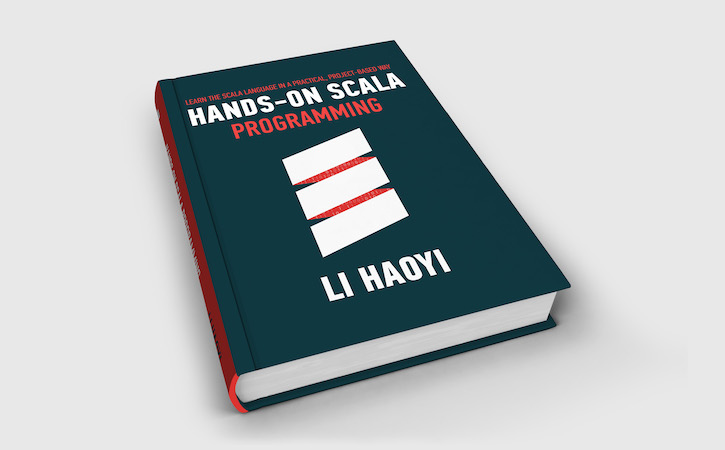
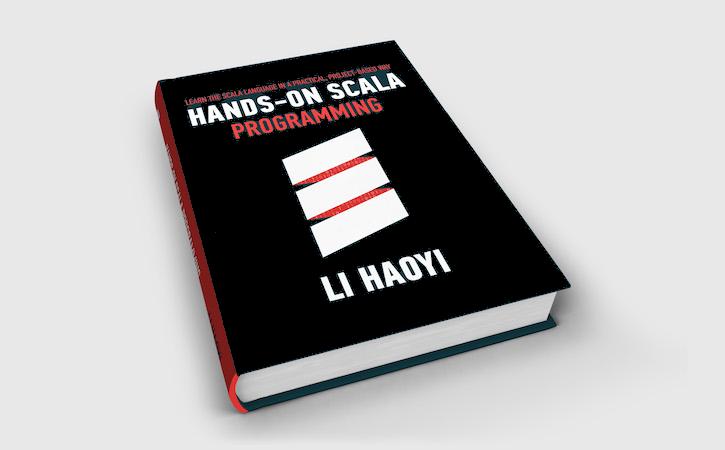
Exercise: A Flood Fill is a common operation to perform on images: starting from a
given pixel, search any adjacent pixels that are sufficiently "similar",
repeating the process in a breadth or depth first fashion until there are no
more pixels to search. Using the Java standard library, implement a
floodFill function that can be called as follows to perform a flood fill on
the image below, changing the color of the book cover from blue to black:
TestFloodFill.scala6.35.scala//| moduleDeps: [FloodFill.scala]defmain()=floodFill(src="Raw.jpg",dest="Filled.jpg",startX=180,startY=90,compareColors={(a:java.awt.Color,b:java.awt.Color)=>defsqrDiff(f:java.awt.Color=>Int)=math.pow(f(a)-f(b),2)math.sqrt(sqrDiff(_.getBlue)+sqrDiff(_.getGreen)+sqrDiff(_.getRed))<25},fillColor=java.awt.Color.BLACK)
|
|
|
- Raw.jpg (https://github.com/handsonscala/handsonscala/tree/v2/resources/6)
- Filled.jpg (https://github.com/handsonscala/handsonscala/tree/v2/resources/6)


The main functionality that you need from the Java standard library is given below:
See example 6.11 - FloodFillExampleApiUsage.scala6.36.scaladefmain()=valraw=javax.imageio.ImageIO.read(java.io.File("Raw.jpg"))val(x,y)=(90,180)valcolor=java.awt.Color(raw.getRGB(x,y))val(r,g,b)=(color.getRed,color.getGreen,color.getBlue)raw.setRGB(x,y,java.awt.Color.BLACK.getRGB)javax.imageio.ImageIO.write(raw,"jpg",java.io.File("Out.jpg"))