11
Scraping Websites
| 11.1 Scraping Wikipedia | 207 |
| 11.2 MDN Web Documentation | 211 |
| 11.3 Scraping MDN | 213 |
| 11.4 Putting it Together | 217 |
> val doc = Jsoup.connect("http://en.wikipedia.org/").get()
> doc.title()
res0: String = "Wikipedia, the free encyclopedia"
> val headlines = doc.select("#mp-itn b a")
headlines: org.jsoup.select.Elements =
<a href="/wiki/Michel_Devoret" title="Michel Devoret">Michel Devoret</a>
<a href="/wiki/Mary_E._Brunkow" title="Mary E. Brunkow">Mary E. Brunkow</a>
<a href="/wiki/Shimon_Sakaguchi" title="Shimon Sakaguchi">Shimon Sakaguchi</a>
...
Snippet 11.1: scraping Wikipedia's front-page links using the Jsoup third-party library in the Scala REPL
The user-facing interface of most networked systems is a website. In fact, often that is the only interface! This chapter will walk you through using the Jsoup library from Scala to scrape human-readable HTML pages, unlocking the ability to extract data from websites that do not provide access via an API.
Apart from third-party scraping websites, Jsoup is also a useful tool for testing the HTML user interfaces that we will encounter in Chapter 14: Simple Web and API Servers. This chapter is also a chance to get more familiar with using Java libraries from Scala, a necessary skill to take advantage of the broad and deep Java ecosystem. Lastly, it is an exercise in doing non-trivial interactive development in the Scala REPL, which is a great place to prototype and try out pieces of code that are not ready to be saved in a script or project.
The examples in this chapter will use the Jsoup HTML query library in the Scala REPL:
$ ./mill --import org.jsoup:jsoup:1.21.2 repl

> import org.jsoup.*
11.2.scala
11.1 Scraping Wikipedia
To get started with Jsoup, we can follow the first example in the Jsoup documentation:
The example snippet downloads the front page of Wikipedia as a HTML document, then extracts the links and titles of the "In the News" articles. Although Jsoup is a Java library, translating their usage examples from Java to Scala code is straightforward, like what we saw earlier in Chapter 9: Self-Contained Scala Scripts.
First, we need to call org.jsoup.Jsoup.connect in order to download a simple
web page to get started:
> val doc = Jsoup.connect("http://en.wikipedia.org/").get()
doc: org.jsoup.nodes.Document = <!doctype html>
<html class="client-nojs ..." lang="en" dir="ltr">
<head><meta charset="UTF-8">
<title>, the free encyclopedia</title>
...
Most functionality in the Jsoup library lives in the org.jsoup.Jsoup class.
Above we used .connect to ask Jsoup to download a HTML page from a URL and
parse it for us, but we can also use .parse to parse a string available
locally. This could be useful if we already downloaded the HTML files ahead of
time, and just need to do the parsing without any fetching. The Wikipedia front
page at the time of writing has been saved as:
- Wikipedia.html (https://github.com/handsonscala/handsonscala/tree/v2/resources/11)
You can download it manually and parse it offline, without relying on the online
en.wikipedia.org website being available:
> val doc = Jsoup.parse(os.read(os.pwd / "Wikipedia.html"))
doc: org.jsoup.nodes.Document = <!doctype html>
<html class="client-nojs" lang="en" dir="ltr">
<head><meta charset="UTF-8">
<title>, the free encyclopedia</title>
...
While Jsoup provides a myriad of different ways for querying and modifying a
document, we will focus on just a few: .select, .text, and .attr
11.1.1 Selection
.select is the main way you can query for data within a HTML document. It
takes a
CSS Selector
string, and uses that to select one or more elements within the document that
you may be interested in. Note that we use import scala.jdk.CollectionConverters.*
to enable the .asScala extension method: this makes it more convenient to convert
between the Java collections that the Jsoup library uses and the Scala
collections in our Scala REPL.
> import scala.jdk.CollectionConverters.*
> val headlines = doc.select("#mp-itn b a").asScala
headlines: mutable.Buffer[org.jsoup.nodes.Element] = Buffer(
<a href="/wiki/Bek_Air_Flight_2100" title="Bek Air Flight 2100">Bek Air Flight 2100</a>,
<a href="/wiki/Assassination_of_..." title="Assassination of ...">2018 killing</a>,
...
The basics of CSS selectors are as follows:
11.1.2 CSS Selector Cheat Sheet
|
|
Selects all elements with that tag name, e.g. |
|
|
Selects all elements with that ID, e.g. |
|
|
Selects all elements with that class, e.g. |
|
|
Selectors combined without spaces find elements matching all of them, e.g. |
|
|
Selectors combined with spaces find elements that support the leftmost
selector, then any (possibly nested) child elements that support the next
selector, and so forth. e.g. this would match the innermost |
|
|
Selectors combined with But not the inner |
11.1.3 Choosing Selectors via Inspect Element
To come up with the selector that would give us the In the News articles, we
can go to Wikipedia in the browser and right-click Inspect on the part of the
page we are interested in:
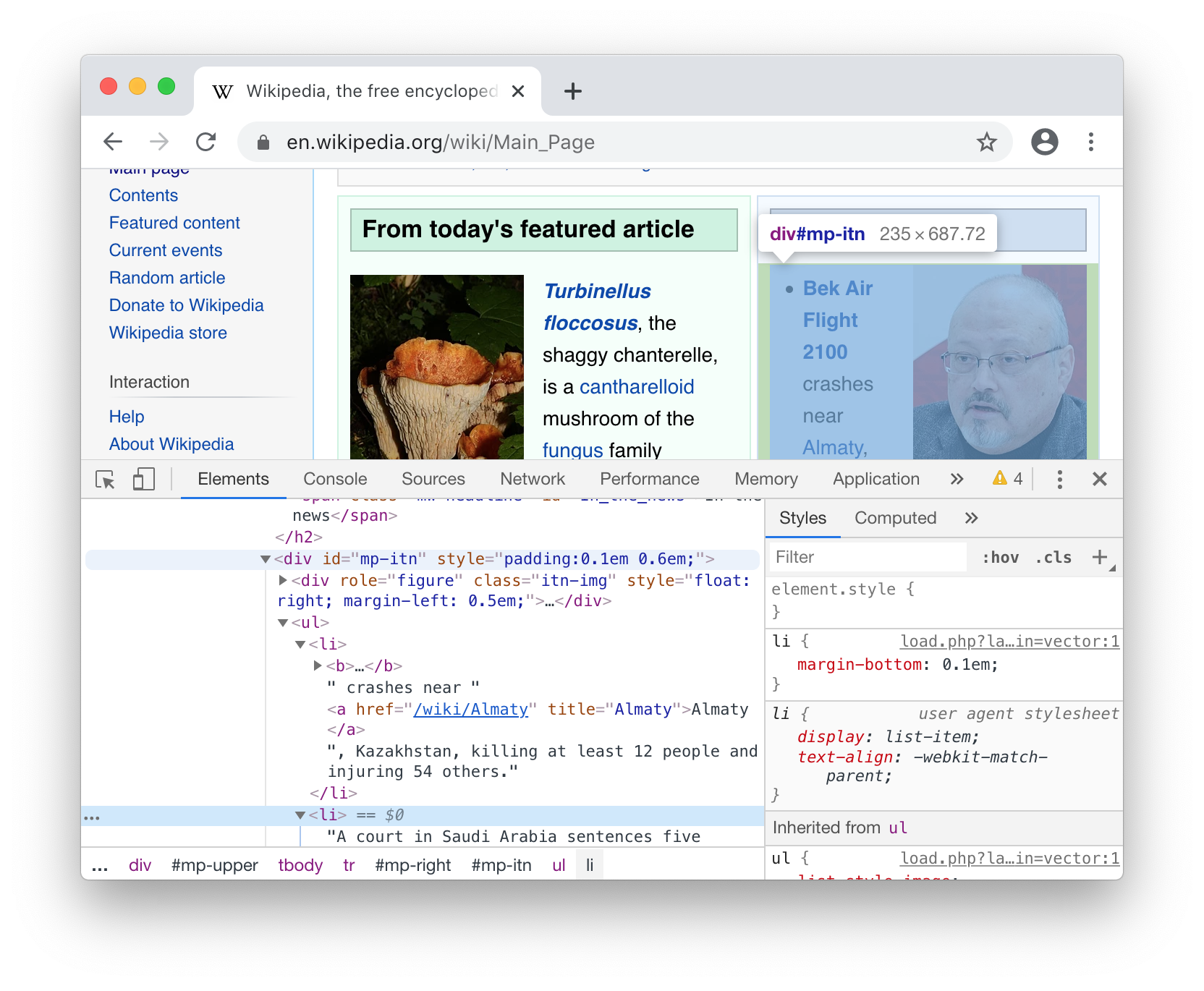
In the Elements tab of the developer tools pane above, we can see
-
The
<div>enclosing that part of the page hasid="mp-itn", so we can select it using#mp-itn. -
Within that
<div>, we have an<ul>unordered list full of<li>list items. -
Within each list item is a mix of text and other tags, but we can see that the links to each article are always bolded in a
<b>tag, and inside the<b>there is an<a>link tag
To select those links, we can thus combine #mp-itn b and a into a single
doc.select("#mp-itn b a"). Apart from .select, there are other methods like
.next, .nextAll, .nextSibling, .nextElementSibling, etc. to help find
what you want within the HTML. These will be useful later.
11.1.4 Extracting data
Now that we've gotten the elements we want, the next step would be to retrieve the data we want from each element. HTML elements have three main things we care about:
-
Attributes of the form
foo="bar", which Jsoup gives you via.attr("foo") -
Text contents, e.g.
<foo>hello world</foo>, which Jsoup gives you via.text -
Direct child elements, which Jsoup gives you via
.children.
We can iterate over the headlines elements and pick out the parts we want,
whether attributes like the mouse-over title or the link target href, or the
.text that the user will see on screen:
> for headline <- headlines yield (headline.attr("title"), headline.attr("href"))
res1: mutable.Buffer[(String, String)] = ArrayBuffer(
("Bek Air Flight 2100", "/wiki/Bek_Air_Flight_2100"),
("Assassination of ...", "/wiki/Assassination_of_..."),
("State of the...", "/wiki/State_of_the_..."),
...
> for headline <- headlines yield headline.text
res2: mutable.Buffer[String] = ArrayBuffer(
"Bek Air Flight 2100",
"2018 killing",
"upholds a ruling",
...
Thus, we are able to pick out the names of the In the News Wikipedia articles, and their titles and URLs, by using Jsoup to scrape the Wikipedia front page.
11.2 MDN Web Documentation
For the next exercise in this chapter, we will be using Jsoup to scrape the online Mozilla Development Network Web API documentation. Let us assume we want to fetch the first paragraph of documentation, as well as the list of methods and method descriptions, for every interface on the following page:
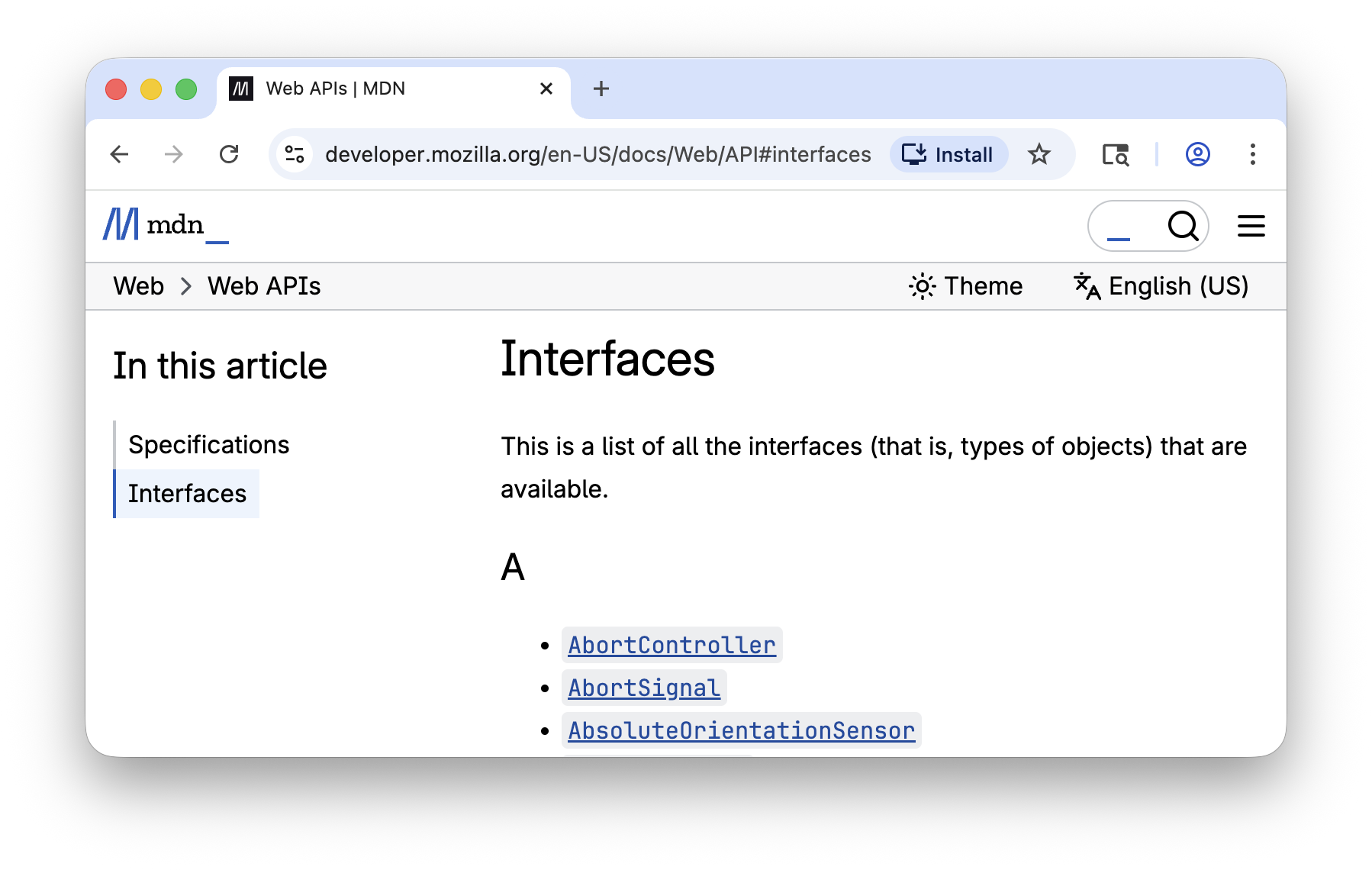
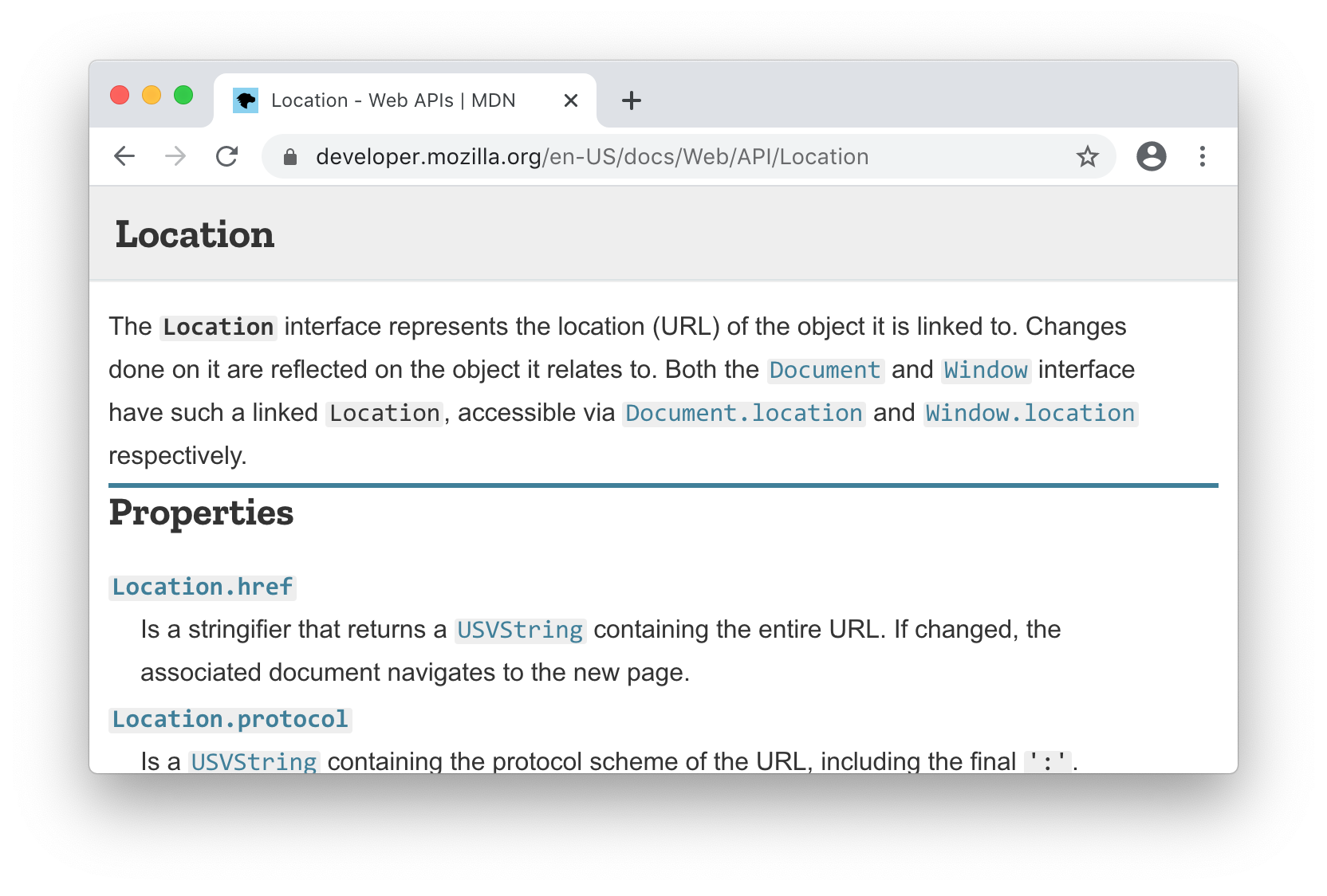
This website contains manually curated documentation for the plethora of APIs
available when writing JavaScript code in the browser, under the Interfaces
section shown below. Each link brings you to the documentation of a single
JavaScript class, which has a short description for the class and a list of
properties and methods, each with their own description:
This content is only semi-structured: as it is hand-written, not every page follows exactly the same layout. Nevertheless, this semi-structured information can still be very useful: perhaps you want to integrate it into your editor to automatically provide some hints and tips while you are working on your own JavaScript code.
Our approach to convert this semi-structured website into something structured and machine-readable will be as follows:
- Scrape the main index page at
https://developer.mozilla.org/en-US/docs/Web/APIto find a list of URLs to all other pages we might be interested in - Loop through the content of each individual URL and scrape the relevant summary documentation
- Aggregate all the scraped summary documentation and save it to a JSON file for use later.
11.3 Scraping MDN
11.3.1 Scraping The Documentation Index
We can right-click and Inspect the top-level index containing the links to
each individual page:
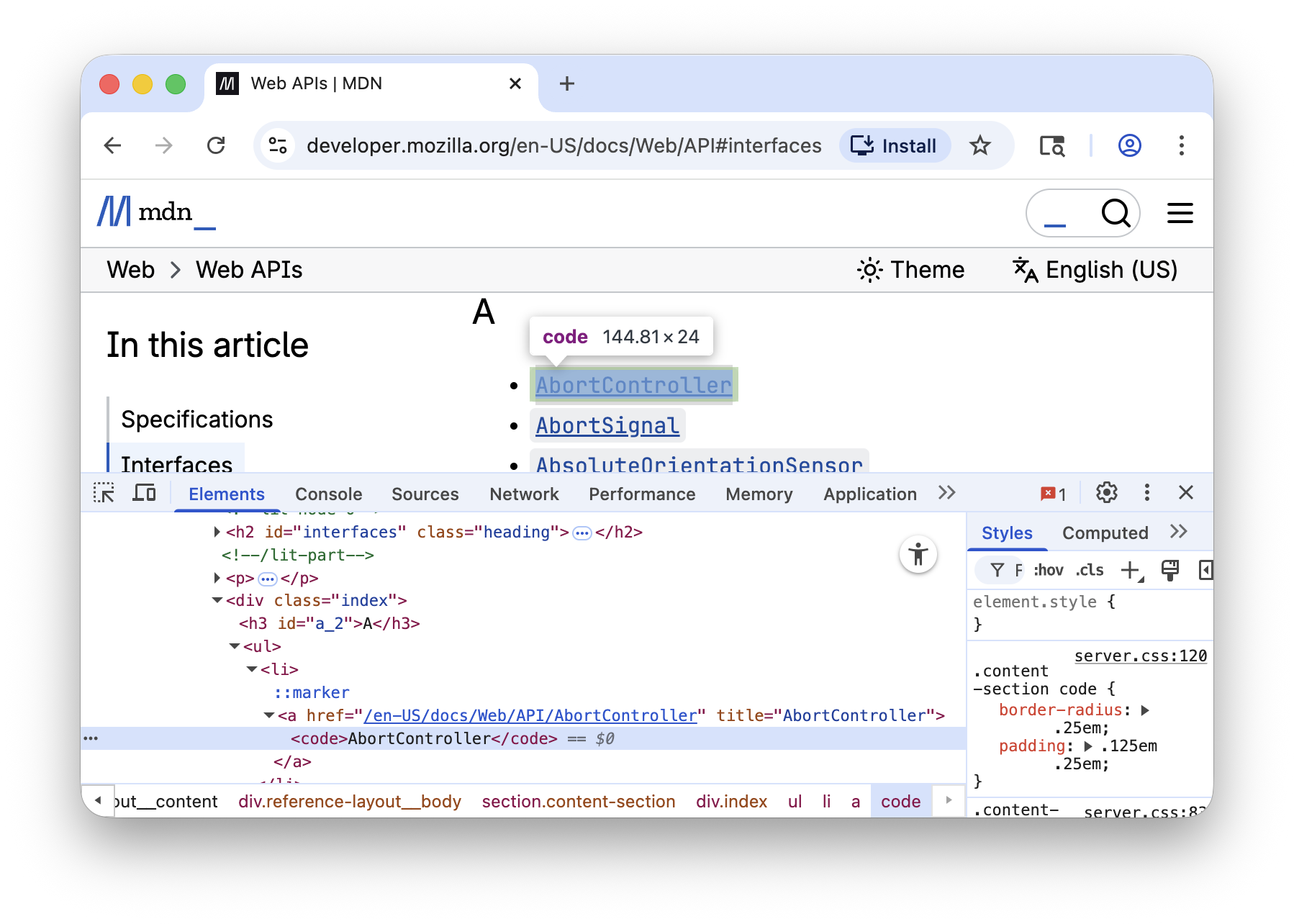
From the Elements pane, we can see that the <h2 id="interfaces"> header can
be used to identify the section we care about, since all of the <a> links are
under the <div class="index" ...> below it. We can thus select all those links
via:
> val doc = Jsoup.connect("https://developer.mozilla.org/en-US/docs/Web/API").get()
doc: org.jsoup.nodes.Document = <!doctype html>
<html lang="en-US" data-theme="light dark" data-renderer="Doc">
<head>...
> val links = doc.select("h2#interfaces").nextAll.select("div.index a").asScala
links: mutable.Buffer[org.jsoup.nodes.Element] = Buffer(
<a href="/en-US/docs/Web/API/AbortController" ...><code>...</code></a>,
<a href="/en-US/docs/Web/API/AbortSignal" ...><code></code></a>,
...
From these elements, we can then extract the high-level information we want from
each link: the URL, the mouse-over title, and the name of the page:
> val linkData = links.map(link => (link.attr("href"), link.attr("title"), link.text))
val linkData: scala.collection.mutable.Buffer[(String, String, String)] = ArrayBuffer(
("/en-US/docs/Web/API/AbortController", "AbortController", "AbortController"),
("/en-US/docs/Web/API/AbortSignal", "AbortSignal", "AbortSignal"),
(
"/en-US/docs/Web/API/AbsoluteOrientationSensor",
"AbsoluteOrientationSensor",
"AbsoluteOrientationSensor"
),
...
From there, we can look into scraping each individual page.
11.3.2 Scraping Each Documentation Page
Let's go back to the Location page we saw earlier:
First, we can connect to that URL to download the HTML and parse it into a Jsoup
Document ready for us to query:
> val url = "https://developer.mozilla.org/en-US/docs/Web/API/Location"
> val doc = Jsoup.connect(url).get()
doc: org.jsoup.nodes.Document = <!doctype html>
<html lang="en-US" data-theme="light dark" data-renderer="Doc">
<head>...
11.3.2.1 Finding the First Paragraph
If we inspect the HTML of the page, we can see that the main page content is
within an <main id="content"> tag, then immediately nested within a <div> and the summary text for this
Location page is simply the first <section> tag within that div:
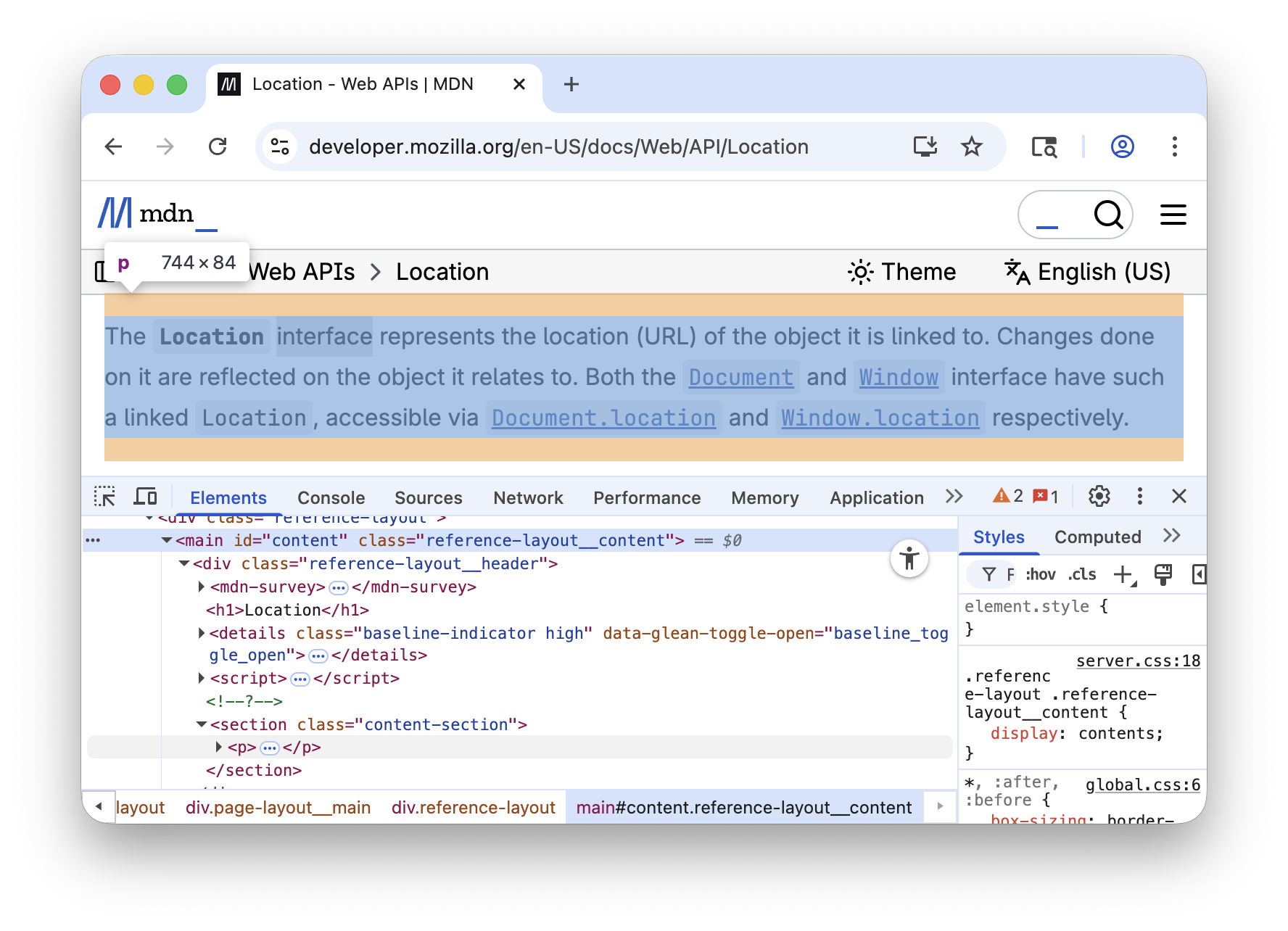
We can use the main#content > div > section > p selector to find all relevant paragraphs within
sections (Note we only want the direct children of #content, hence the
>) and use .head to find the first paragraph:
> doc.select("main#content > div > section > p").asScala.head.text
res3: String = "The Location interface represents the location (URL) of ..."
11.3.2.2 Finding Property and Method Docs
Inspecting the list of properties and methods, we can see that the name and text
for each property and method are within a <dl> definition list, as pairs of
<dt> and <dd> tags:
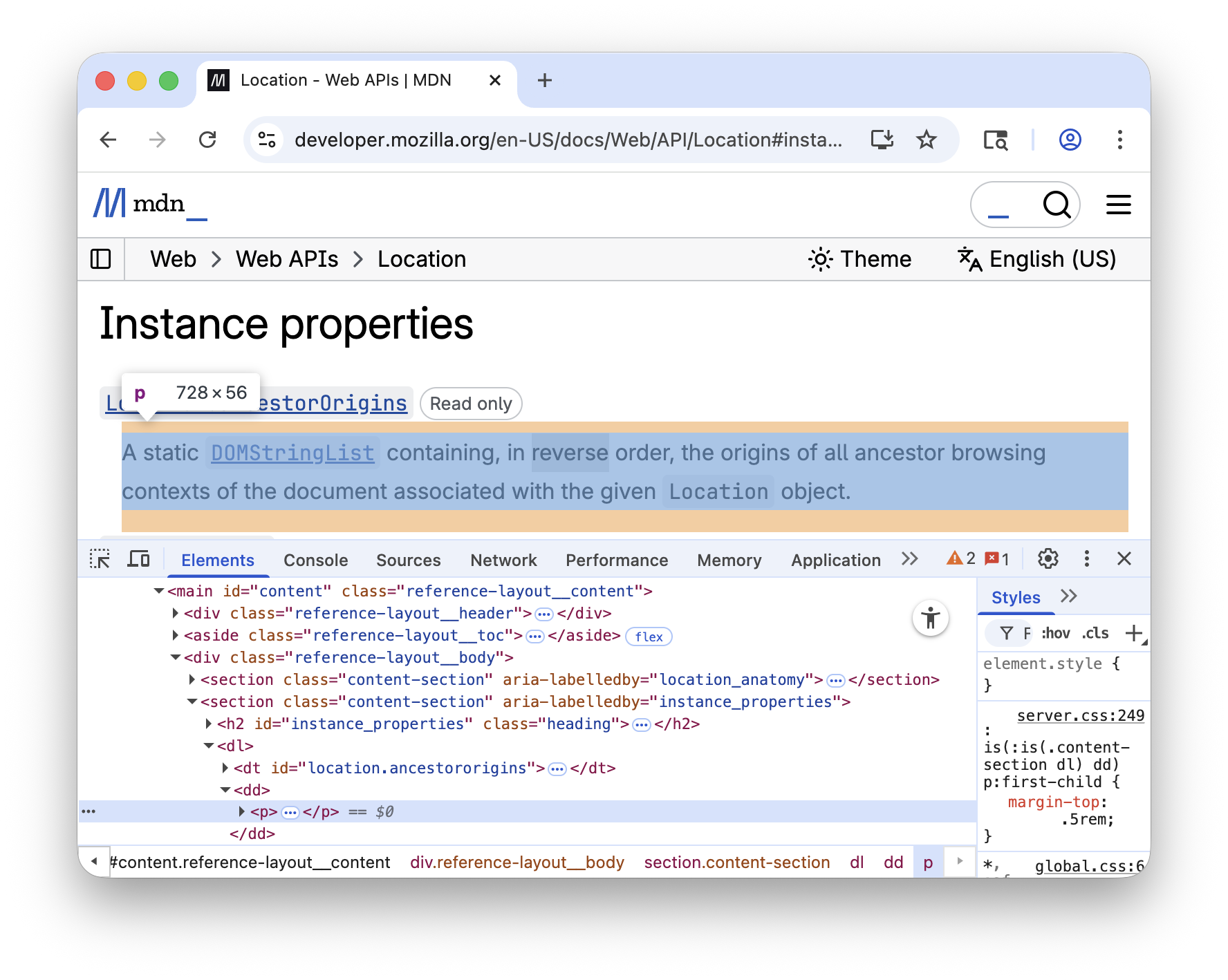
We can use the main#content dl dt selector to find all the tags
containing the name of a property or method:
> val nameElements = doc.select("main#content dl dt").asScala
nameElements: mutable.Buffer[org.jsoup.nodes.Element] = Buffer(
...
</dt>,
<dt id="location.href">
<a href="/en-US/docs/Web/API/Location/href"><code>.href</code></a>
</dt>,
<dt id="location.protocol">
<a href="/en-US/docs/Web/API/Location/protocol"><code>.protocol</code></a>
</dt>,
...
We can then use the .nextElementSibling of each to find the tag containing the
description:
> val nameDescPairs = nameElements.map { element => (element, element.nextElementSibling) }
nameDescPairs:
scala.collection.mutable.Buffer[(org.jsoup.nodes.Element,
org.jsoup.nodes.Element)] = ArrayBuffer(
...
(
<dt id="location.href">
<a href="/en-US/docs/Web/API/Location/href"><code>.href</code></a>
</dt>,
<dd><p><a ...></a> that returns a string containing the entire URL...</p>
</dd>
),
...
Lastly, to retrieve the text within each pair of elements, we can use the
.text attribute:
> val textPairs = nameDescPairs.map { case (k, v) => (k.text, v.text) }
textPairs: mutable.Buffer[(String, String)] = ArrayBuffer(
...
(
"Location.href",
"A stringifier that returns a string containing the entire URL. ..."
),
...
11.4 Putting it Together
Putting together the code we have written so far in the REPL gives us the following script:
ScrapingDocs.scala11.15.scala//| mvnDeps://| - org.jsoup:jsoup:1.21.2importorg.jsoup.*importscalaCollectionConverters.jdk..*valindexDoc=Jsoup.connect("https://developer.mozilla.org/en-US/docs/Web/API").get()vallinks=indexDoc.select("h2#interfaces").nextAll.select("div.index a").asScalavallinkData=links.map(link=>(link.attr("href"),link.attr("title"),link.text))valarticles=for(url,tooltip,name)<-linkDatayieldprintln("Scraping "+name)valdoc=Jsoup.connect("https://developer.mozilla.org"+url).get()valsummary=doc.select("main#content > div > section > p").asScala.headOptionmatchcaseSome(n)=>n.textcaseNone=>""valmethodsAndProperties=doc.select("main#content dl dt").asScala.map:el=>(el.text,el.nextElementSiblingmatchcasenull=>""casex=>x.text)(url,tooltip,name,summary,methodsAndProperties)
Note that we added a bit of error handling in here: rather than fetching the
summary text via .head.text, we match on .headOption to account for the
possibility that there is no summary paragraph. Similarly, we check
.nextElementSibling to see if it is null before calling .text to fetch its
contents. Other than that, it is essentially the same as the snippets we saw
earlier. This should take a few minutes to run, as it has to fetch every page
individually to parse and extract the data we want, producing the following
output:
articles: Buffer[(String, String, String, String, Buffer[(String, String)])] = ArrayBuffer(
    (
        "/en-US/docs/Web/API/AbortController",
        "AbortController",
        "AbortController",
        "The AbortController interface represents a controller object that allows...",
        ArrayBuffer(
            ("AbortController()", "Creates a new AbortController object instance."),
            (
                "AbortController.signal Read only",
                "Returns an AbortSignal object instance, which can be used to ..."
            ),
            ...
        )
    ),
    ...
11.16.output-scala
articles contains the first-paragraph summary of every documentation. We can
see how many articles we have scraped in total, as well as how many member and
property documentation snippets we have fetched. Lastly, if we need to use this
information elsewhere, it is easy to dump to a JSON file that can be accessed
later, perhaps from some other process.
$ ./mill ScrapingDocs.scala:repl

> articles.length
res4: Int = 1018

> articles.map(_(4).length).sum
res5: Int = 7566

> os.write.over(os.pwd / "docs.json", upickle.write(articles, indent = 4))

> os.read(os.pwd / "docs.json")
res6: String = """[
    [
        "/en-US/docs/Web/API/AbortController",
        "AbortController",
        "AbortController",
        "The AbortController interface represents a controller object that ...",
...
"""
11.17.scala
11.5 Conclusion
In this chapter, we walked through the basics of using the Jsoup HTML parser to scrape semi-structured data from Wikipedia's human-readable HTML pages. We then took the well-known MDN Web API Documentation and extracted summary documentation for every interface, method and property documented within it. We did our scraping interactively in the REPL, and were able to explore the data we scraped to make sure we were getting what we wanted. For re-usability, we saved the code in a Scala Script that we can easily run later.
Scraping websites is a core tool that every software engineer should have in their toolbox. Almost every third-party system or service exposes a web interface, and knowing how to scrape their interface opens up a host of possibilities in integrating these systems into your own programs and data processing.
This chapter only covers the basics of web scraping: for websites that need user accounts or have front-end Javascript, you may need to use Requests-Scala, or a more full-featured browser automation environment like Selenium. Nevertheless, this should be enough to get you started with the basic concepts of fetching, navigating and scraping HTML websites using Scala.
In the next chapter, Chapter 12: Working with HTTP APIs, we will look at how we can take advantage of the structured HTTP/JSON APIs that some systems expose for third party code to integrate with.
Exercise: The MDN Web APIs page (https://developer.mozilla.org/en-US/docs/Web/API) has annotations marking the APIs which are deprecated, experimental, not yet standardized, and so on. Use Jsoup to scrape the annotations for every Web API and store them in a JSON file for later use.
See example 11.3 - ApiStatusExercise: Link rot is a common problem in any website, where URLs that were previously
valid become invalid over time. Write a script that uses Jsoup to traverse the
graph of .html pages and links on https://www.lihaoyi.com and returns a list
of all internal and external links, so they can be checked for validity. You
can use java.net.URI to help normalize the URLs and ensure you do not
process the same page more than once.
Exercise: Many modern discussion forums have "threaded" discussions, meaning the
discussion takes place in a tree-like format rather than in a linear sequence
of comments. Use Jsoup to scrape the discussion off the following HTML web
page from the https://lobste.rs/ discussion forum, converting it into a
tree-like data structure defined by the case class below.
- Lobsters.html (https://github.com/handsonscala/handsonscala/tree/v2/resources/11)
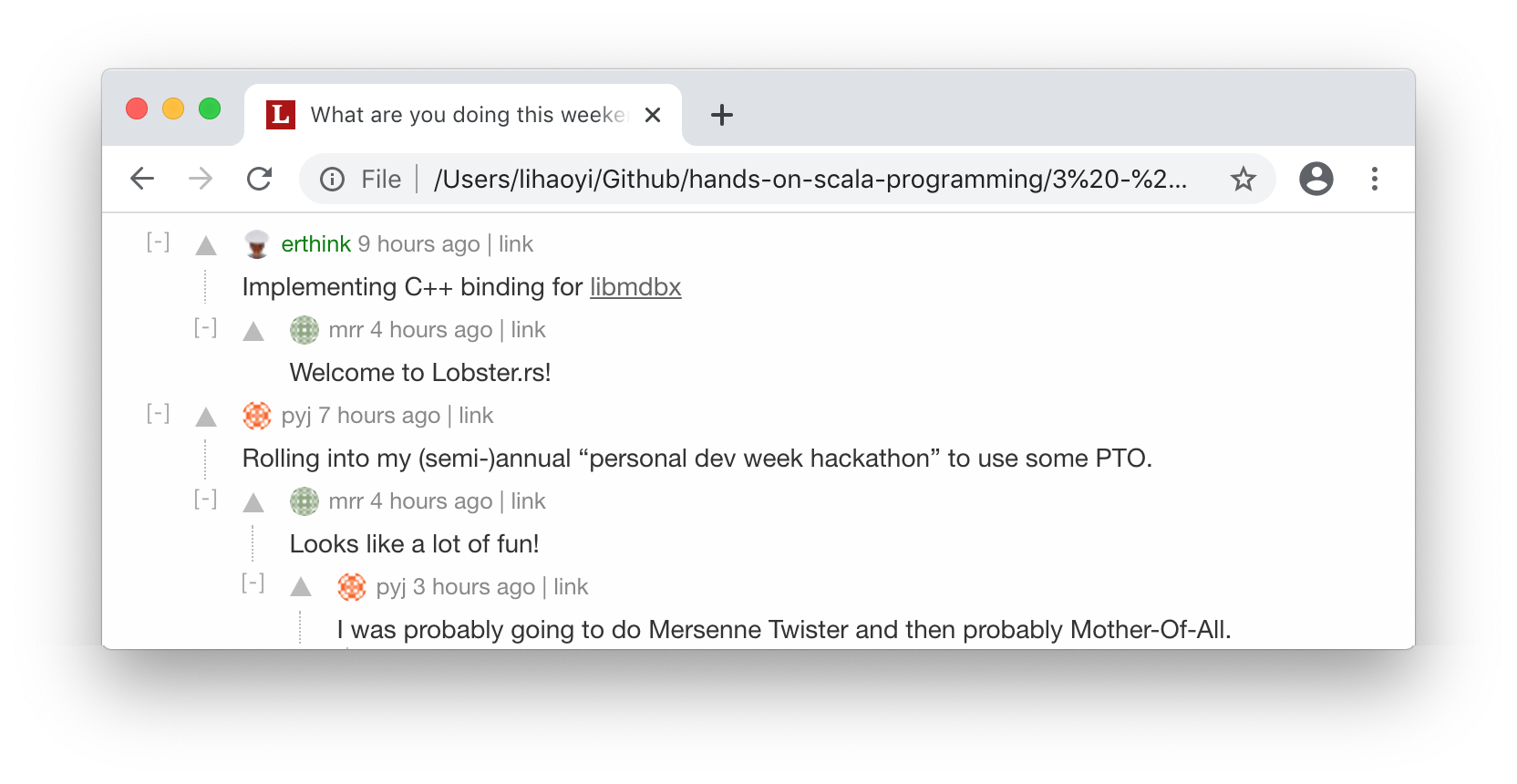
Comment("erthink", "Implementing C++ binding for libmdbx",
    List(Comment("mrr", "Welcome to Lobster.rs!", List()))
),
Comment("pyj", "Rolling into my (semi-)annual...",
    List(
        Comment("mrr", "Looks like a lot of fun!",
            List(
                Comment("pyj", "I was probably going to do...", List(...))
            )
        )
    )
),
11.18.scala