15
Querying SQL Databases
| 15.1 Setting up ScalaSql and PostgreSQL | 287 |
| 15.2 Mapping Tables to Case Classes | 289 |
| 15.3 Querying and Updating Data | 293 |
| 15.4 Transactions | 299 |
| 15.5 A Database-Backed Chat Website | 300 |
> db.run(
City.select
.filter(c => c.population > 5000000 && c.countryCode === "CHN")
.map(c => (c.name, c.countryCode, c.district, c.population))
)
query: SELECT city0.name AS res_0, city0.countrycode AS res_1, ...
res35: Seq[(String, String, String, Int)] = Vector(
("Shanghai", "CHN", "Shanghai", 9696300),
("Peking", "CHN", "Peking", 7472000),
("Chongqing", "CHN", "Chongqing", 6351600),
("Tianjin", "CHN", "Tianjin", 5286800)
)
Snippet 15.1: using the ScalaSql database query library from the Scala REPL
Most modern systems are backed by relational databases. This chapter will walk you through the basics of using a relational database from Scala, using the ScalaSql query library. We will work through small self-contained examples of how to store and query data within a Postgres database, and then convert the interactive chat website we implemented in Chapter 14: Simple Web and API Servers to use a Postgres database for data storage.
15.1 Setting up ScalaSql and PostgreSQL
15.1.1 Library Setup
For the first part of this chapter, we will use the Scala REPL. For library dependencies, we also need the ScalaSql database query library, the Postgres Java library, and the Zonky Embedded Postgres database library:
$ ./mill --import com.lihaoyi::scalasql-simple:0.2.7 \
  --import org.postgresql:postgresql:42.7.8 \
  --import io.zonky.test:embedded-postgres:2.1.1 \
  repl
15.2.scala
Zonky's (forked from OpenTable) Embedded Postgres library will make it convenient to spin up a small Postgres database for us to work with, so we do not need to install a Postgres database globally. For production use, you will likely be using a separately managed database server, perhaps hosted on Heroku Postgres or Amazon RDS.
To begin with we will start our test database and set up a ScalaSql data source connected to it:
> import io.zonky.test.db.postgres.embedded.EmbeddedPostgres
> val server = EmbeddedPostgres.builder().setPort(5432).start()
server: io.zonky.test.db.postgres.embedded.EmbeddedPostgres =
EmbeddedPG-7e32d353-dd40-46bf-8dc8-095dc99a0945
> {
import scalasql.simple.*, PostgresDialect.*
val pgDataSource = new org.postgresql.ds.PGSimpleDataSource()
pgDataSource.setUser("postgres")
val client = scalasql.DbClient.DataSource(
pgDataSource,
config = new scalasql.Config:
override def logSql(sql: String, file: String, line: Int) = println(s"query: $sql")
override def nameMapper(v: String) = v.toLowerCase
)
val db = client.getAutoCommitClientConnection
}
db will be our primary interface to the Postgres database through ScalaSql. The
PGSimpleDataSource class exposes most of the things you
can configure when connecting to the Postgres database, e.g. setUser above,
but for now we will mostly stick with the defaults.
15.1.2 Sample Data
As sample data for this chapter, we will be using a Postgres version of the
popular world.sql dataset:
CREATE TABLE IF NOT EXISTS city (
id integer NOT NULL,
name varchar NOT NULL,
countrycode character(3) NOT NULL,
district varchar NOT NULL,
population integer NOT NULL
);
CREATE TABLE IF NOT EXISTS country (
...
This can be downloaded from:
- world.sql (https://github.com/handsonscala/handsonscala/tree/v2/resources/15)
This file defines a simple database including all the cities in the world, all the countries in the world, and the languages each country speaks. We will be using this dataset to exercise our database queries and actions.
15.1.3 PG-CLI
In a separate terminal, we will be using the open source PG-CLI tool to directly connect to our test Postgres database:
After installation, you can connect PG-CLI to the local test database via
pgcli:
$ pgcli -U postgres -p 5432 -h localhost
Server: PostgreSQL 14.19
Version: 4.3.0
Home: http://pgcli.com
postgres@localhost:postgres>
15.5.bash
We can import out sample data into our postgres database using PG-CLI:
pg> \i world.sql;
PG-CLI uses the standard Postgres \d command to list tables and columns:
pg> \d
+----------+-----------------+--------+----------+
| Schema   | Name            | Type   | Owner    |
|----------+-----------------+--------+----------|
| public   | city            | table  | postgres |
| public   | country         | table  | postgres |
| public   | countrylanguage | table  | postgres |
+----------+-----------------+--------+----------+
15.6.sql
15.2 Mapping Tables to Case Classes
ScalaSql expects tables to be represented by Scala case classes, with individual
columns within each table mapping to primitive data types. As a first
approximation, the mapping is as follows:
| Postgres | Scala |
|---|---|
real |
Float, Double |
boolean |
Boolean |
integer, smallint, bigint |
Int, Long |
character(n), character varying |
String |
numeric(n,m) |
java.math.BigDecimal |
This particular Postgres database uses a lowercase variable name convention,
which doesn't quite match Scala's PascalCase for class names and camelCase
for field names. To map between these two conventions, we had earlier defined
our ScalaSql client to use a v.toLowerCase function for its name mapper.
There is also a Config.camelToSnake builtin, used by default.
If your database uses another naming convention then you will need to
override the nameMapper method in a custom scalasql.Config. Also note that we
override logSql to print queries whenever they are made.
Defining the case classes representing each table is straightforward. Here is
the mapping from table schema to case class for each of the tables in this
world.sql, which extend scalasql.simple.SimpleTable:
|
|
|
|
|
|
Optional values which do not have a Postgres not null flag set are modeled
using Scala Option[T]s.
You can then try out basic queries to fetch the various tables and map them to
the Scala case classes, using the select method of the companion object:
> db.run(City.select)
query: SELECT city0.id AS id, city0.name AS name, city0.countr... FROM city city0
res0: Seq[City] = Vector(
City(
id = 1,
name = "Kabul",
countryCode = "AFG",
district = "Kabol",
population = 1780000
),
City(
...
> db.run(Country.select)
query: SELECT country0.code AS code, country0.name AS nam... FROM country country0
res1: Seq[Country] = Vector(
Country(
code = "AFG",
name = "Afghanistan",
continent = "Asia",
region = "Southern and Central Asia",
surfaceArea = 652090.0,
indepYear = Some(1919),
population = 22720000,
...
> db.run(CountryLanguage.select)
query: SELECT countrylanguage0.countrycod... FROM countrylanguage countrylanguage0
res2: Seq[CountryLanguage] = Vector(
CountryLanguage(
countrycode = "AFG",
language = "Pashto",
isOfficial = true,
percentage = 52.4
),
CountryLanguage(
countrycode = "NLD",
language = "Dutch",
...
Note that dumping the entire database table to in-memory case class objects is
probably not something you want to do on a large production database, but on
this small sample database it's unlikely to cause issues. You can use .take(n)
inside the db.run(...) if you want to limit the number of entries fetched
from the database.
When compiling your code for each command above, ScalaSql prints out the exact SQL query that is being prepared and will be executed at runtime. This can be useful if your ScalaSql query is misbehaving and you are trying to figure out what exactly it is trying to do. You can always go to your PG-CLI console and enter that same SQL directly into the console:
pg> SELECT city0.id AS id, city0.name AS name, city0.countrycode AS countrycode,
    city0.district AS district, city0.population AS population FROM city city0
+------+----------------+---------------+----------------------+--------------+
| id   | name           | countrycode   | district             | population   |
|------+----------------+---------------+----------------------+--------------|
| 1    | Kabul          | AFG           | Kabol                | 1780000      |
| 2    | Qandahar       | AFG           | Qandahar             | 237500       |
| 3    | Herat          | AFG           | Herat                | 186800       |
| 4    | Mazar-e-Sharif | AFG           | Balkh                | 127800       |
| 5    | Amsterdam      | NLD           | Noord-Holland        | 731200       |
...
15.16.sql
Throughout this chapter, the various ScalaSql .select, .map, .filter, etc.
method calls you write in the db.run(...) call do not execute within your
Scala application: instead, they are compiled to SQL code and executed directly
in the database. Compared to just fetching everything and doing the .maps and
.filters in your application, ScalaSql's approach reduces the load on the
application servers by moving the logic to the database, and also reduces the
load on the database by greatly reducing the amount of data that the application
server needs to fetch.
While you can also perform database operations by sending raw SQL strings to the database to execute, doing so is much more fragile than ScalaSql's compiler-checked query expressions, and far more prone to security vulnerabilities.
15.3 Querying and Updating Data
Now that we have set up a simple sample database, and have configured ScalaSql to work with it, we can start performing more interesting queries.
15.3.1 Filtering
A Scala .filter translates into a SQL WHERE clause. You can use that to find
individual entries by name or by id:
> db.run(City.select.filter(_.name === "Singapore"))
query: SELECT city0.id AS id, city0.name AS name, city... WHERE (city0.name = ?)
res3: Seq[City] = Vector(
City(
id = 3208,
name = "Singapore",
countryCode = "SGP",
district = "",
population = 4017733
)
)
> db.run(City.select.filter(_.id === 3208))
query: SELECT city0.id AS id, city0.name AS name, city... WHERE (city0.id = ?)
res4: Seq[City] = Vector(
City(
id = 3208,
name = "Singapore",
...
You can also find all entries that match arbitrary predicates, e.g. based on
population below:
> db.run(City.select.filter(_.population > 9000000))
query: SELECT city0.id AS id, city0.name AS name, ... WHERE (city0.population > ?)
res5: Seq[City] = Vector(
City(
id = 206,
name = "São Paulo",
countryCode = "BRA",
district = "São Paulo",
population = 9968485
),
City(
...
Predicates can have more than one clause, e.g. here we filter on both
population and countryCode:
> db.run(City.select.filter(c => c.population > 5000000 && c.countryCode === "CHN"))
query: SELECT city0... WHERE ((city0.population > ?) AND (city0.countrycode = ?))
res9: Seq[City] = Vector(
City(
id = 1890,
name = "Shanghai",
countryCode = "CHN",
district = "Shanghai",
population = 9696300
),
City(
id = 1891,
name = "Peking",
countryCode = "CHN",
district = "Peking",
population = 7472000
),
City(
id = 1892,
name = "Chongqing",
countryCode = "CHN",
district = "Chongqing",
population = 6351600
),
City(
id = 1893,
name = "Tianjin",
countryCode = "CHN",
district = "Tianjin",
population = 5286800
)
)
If there are relevant table indices present, the WHERE clause generated by
filters will make use of them to speed up the lookup, otherwise it may end up
doing a slow full table scan. A detailed discussion of database index
performance is beyond the scope of this book.
15.3.2 Dynamic Values
If you want to include dynamic values in your queries, e.g. filtering by a value
that isn't a constant, you can abstract via a method, e.g. with a cityId argument:
> def find(cityId: Int) = db.run(City.select.filter(_.id === cityId))
> find(3208)
query: SELECT city0.id AS id, city0.name AS name, city0.co... WHERE (city0.id = ?)
res10: Seq[City] = Vector(
City(
id = 3208,
name = "Singapore",
...
> find(3209)
query: SELECT city0.id AS id, city0.name AS name, city0.co... WHERE (city0.id = ?)
res11: Seq[City] = Vector(
City(
id = 3209,
name = "Bratislava",
...
Notice how this query, with a dynamic variable cityId used in it, is
converted into a parameterized SQL query with a WHERE (city0.id = ?) clause. This
avoids SQL injection vulnerabilities and makes it easier for the database to
optimize your queries.
ScalaSql works via a constructive approach:
the operations used within a db.run(...) are all provided from the PostgresDialect.* import.
These operations correspond 1:1 with what is available in PostgreSQL.
Invalid operations (that you might otherwise expect to work) are a compilation error:
> db.run(City.select.filter(_.name.take(4) === "Sing"))
-- [E008] Not Found Error: -----------------------------------------------------
1 |db.run(City.select.filter(_.name.take(4) === "Sing"))
| ^^^^^^^^^^^
|value take is not a member of scalasql.core.Expr[String]...
Inside of an expression, columns are wrapped in an Expr[T] type, and various operations
such as === and > are provided by extension methods within the
imported dialect object.
15.3.3 Mapping
Often you do not need all the values in a particular table. For example, the
country table has 15 different values per row, and if you are only interested
in 2-3 of them, fetching them all is a waste of CPU time, memory, and network
bandwidth. You can thus use .map to pick the columns that you are interested
in:
> db.run(Country.select.map(c => (c.name, c.continent)))
query: SELECT country0.name AS res_0, country0.continent AS res_1
FROM country country0
res12: Seq[(String, String)] = Vector(
("Afghanistan", "Asia"),
("Netherlands", "Europe"),
("Netherlands Antilles", "North America"),
...
> db.run(Country.select.map(c => (c.name, c.continent, c.population)))
query: SELECT country0.name AS res_0, country0.continent AS res_1,
country0.population AS res_2 FROM country country0
res13: Seq[(String, String, Int)] = Vector(
("Afghanistan", "Asia", 22720000),
("Netherlands", "Europe", 15864000),
("Netherlands Antilles", "North America", 217000),
...
You can combine the various operations in any order, e.g. here is a
parameterized query that combines a filter and map with a parameter cityId to fetch
the name of the city with a particular ID:
> def findName(cityId: Int) = db.run(City.select.filter(_.id === cityId).map(_.name))
> findName(3208)
query: SELECT city0.name AS res FROM city city0 WHERE (city0.id = ?)
res14: Seq[String] = Vector("Singapore")
> findName(3209)
query: SELECT city0.name AS res FROM city city0 WHERE (city0.id = ?)
res15: Seq[String] = Vector("Bratislava")
15.3.4 Joins
Joins allow you to make use of data split across multiple tables. For example,
if we want to query "the name of every city in the continent of Asia", the city
names are in the city table, but the continent name is in the country table.
You can use joins to perform a query that uses data from both tables:
> db.run(
City.select
.join(Country.select)(_.countryCode === _.code)
.filter((city, country) => country.continent === "Asia")
.map((city, country) => city.name)
)
query: SELECT city0.name AS res FROM city city0 JOIN (SELECT country1.code
AS code, country1.continent AS continent FROM country country1) subquery1
ON (city0.countrycode = subquery1.code) WHERE (subquery1.continent = ?)
res16: Seq[String] = Vector(
"Kabul",
"Qandahar",
"Herat",
"Mazar-e-Sharif",
"Dubai",
"Abu Dhabi",
...
You can also join more than two tables, as long as there is some sort of key you
can use to match the relevant rows in each table, similar to how above we are
matching the countryCode in the City table with the code in the Country
table.
15.3.5 Inserts
You can use the .insert.values syntax to insert data into a database table:
> db.run(City.insert.values(City(10000, "test", "TST", "Test County", 0)))
query: INSERT INTO city (id, name, countrycode, district, population) VALUES (?,
?, ?, ?, ?)
res17: Int = 1
> db.run(City.select.filter(_.population === 0))
query: SELECT city0.id AS id, city0.name AS name, ... WHERE (city0.population = ?)
res18: Seq[City] = Vector(
City(
id = 10000,
name = "test",
countryCode = "TST",
district = "Test County",
population = 0
)
)
There is also a batch insertion syntax, using .insert.values and Scala's
varargs spread operator *:
> val cities = List(
City(10001, "testville", "TSV", "Test County", 0) ,
City(10002, "testopolis", "TSO", "Test County", 0),
City(10003, "testberg", "TSB", "Test County", 0)
)
> db.run(City.insert.values(cities*))
query: INSERT INTO city (id, name, countrycode, district, population) VALUES (?,
?, ?, ?, ?), (?, ?, ?, ?, ?), (?, ?, ?, ?, ?)
res19: Int = 3
> db.run(City.select.filter(_.population === 0).map(c => (c.id, c.name)))
query: SELECT city0.id AS res_0, city0.name AS ... WHERE (city0.population = ?)
res20: Seq[(Int, String)] = Vector(
(10000, "test"),
(10001, "testville"),
(10002, "testopolis"),
(10003, "testberg")
)
15.3.6 Updates
You can use .update to filter rows matching a predicate, then change individual values
within the row:
> db.run(City.update(_.id === 10000).set(_.name := "testham"))
query: UPDATE city SET name = ? WHERE (city.id = ?)
res21: Int = 1
> db.run(City.select.filter(_.id === 10000).map(c => (c.id, c.name)))
query: SELECT city0.id AS res_0, city0.name AS res_1, ... WHERE (city0.id = ?)
res22: Seq[(Int, String)] = Vector((10000, "testham"))
By changing the predicate, e.g. _.district === "Test County" you can update multiple rows at once:
> db.run(City.update(_.district === "Test County").set(_.district := "Test Borough"))
query: UPDATE city SET district = ? WHERE (city.district = ?)
res25: Int = 4
> db.run(City.select.filter(_.population === 0).map(c => (c.id, c.name, c.district)))
query: SELECT city0.id AS res_0, city0.name AS ... WHERE (city0.population = ?)
res26: Seq[(Int, String, String)] = Vector(
(10001, "testville", "Test Borough"),
(10002, "testopolis", "Test Borough"),
(10003, "testberg", "Test Borough"),
(10000, "testham", "Test Borough")
)
15.4 Transactions
One of the primary features of a database is transactionality: the ability to start a transaction, perform some queries and updates isolated from changes others may be making, and then either committing your changes atomically or rolling them back at the end of the transaction. This helps ensure that if something crashes half way, you don't end up with a database full of corrupted data in a half-updated state.
ScalaSql supports this via the .transaction: syntax. Any updates within
the transaction are only committed when the transaction completes: any other
processes querying the database will not see any half-baked changes.
Furthermore, if the transaction fails with an exception, the changes are never
committed:
> client.transaction: db =>
db.run(City.update(_.district === "Test Borough").set(_.district := "Test County"))
throw Exception("oops!")
query: UPDATE city SET district = ? WHERE (city.district = ?)
java.lang.Exception: oops!
at rs$line$39$.$init$$$anonfun$1(rs$line$39:5)
at scalasql.core.DbClient$Connection.transaction(DbClient.scala:80)
...
> db.run(City.select.filter(_.population === 0).map(c => (c.id, c.name, c.district)))
res27: Seq[(Int, String, String)] = Vector(
(10001, "testville", "Test Borough"),
(10002, "testopolis", "Test Borough"),
(10003, "testberg", "Test Borough"),
(10000, "testham", "Test Borough")
)
As you can see, even though the update call completed, the exception caused
the transaction to abort, and thus the "Test Borough" column in the City
table was never updated. This applies to both exceptions that happen
accidentally in the process of executing your code, and also to exceptions you
throw yourself e.g. to intentionally abort a transaction and discard the
changes.
15.4.1 Why Transactions?
Transactions are a very useful tool to maintain the data integrity of your database.
-
Transactions help ensure that an poorly-timed crash or failure doesn't leave your database in a half-baked state due to a series of updates that only partially completed.
-
When multiple clients are reading and writing to a database concurrently, it ensures each client doesn't see another client's updates until the transaction completes, again ensuring the database is never in a half-updated state.
Note that it is also possible for a transaction to fail due to a conflict: e.g. if two concurrent transactions are reading and writing the same row at the same time. In such a case, the first transaction to complete wins, and the later transaction aborts and discards its changes. For more details on how Postgres transactions work and how they can be configured, check out the Postgres documentation on Transaction Isolation:
15.5 A Database-Backed Chat Website
In Chapter 14: Simple Web and API Servers, we built a simple chat website: users could enter messages in a chat room, where they were made available for other users to see. We will build on top of that code in this chapter, modifying it to turn the in-memory implementation into a database-backed website using ScalaSql and Postgres.
The main limitation of that implementation was the way we stored the messages in-memory:
app/src/MinimalApplication.scalavarmessages=Vector(("alice","Hello World!"),("bob","I am cow, hear me moo"))
app/src/MinimalApplication.scalamessages=messages:+(name->msg)
As implemented above, this webserver stores the messages as an in-memory
Vector[Message]. While this is convenient, the weakness of such a setup is
that if the chat server goes down - whether due to failure or updates - all
messages are lost. Furthermore, the messages cannot be shared between multiple
webserver processes. The obvious solution would be to store the chat messages in
a database that would persist the data, and can be queried by as many webservers
as we have running.
15.5.1 Build Config & Database Setup
To use ScalaSql and Postgres in our website, we first need to add the same
libraries we used above to the build.mill file's def mvnDeps:
build.mill15.30.scaladefmvnDeps=Seq(+mvn"com.lihaoyi::scalasql-simple:0.2.7",+mvn"org.postgresql:postgresql:42.7.8",+mvn"io.zonky.test:embedded-postgres:2.1.1",mvn"com.lihaoyi::scalatags:0.13.1",mvn"com.lihaoyi::cask:0.11.3")
Next, we need to replace the in-memory messages store with a database
connection:
app/src/MinimalApplication.scala15.31.scala+importscalasql.simple.*,PostgresDialect.*objectMinimalApplicationextendscask.MainRoutes:-varmessages=Vector(("alice","Hello World!"),("bob","I am cow, hear me moo"))+caseclassMessage(name:String,msg:String)+objectMessageextendsSimpleTable[Message]+importioEmbeddedPostgres.zonky.test.db.postgres.embedded.++valserver=EmbeddedPostgres.builder()+.setDataDirectory(System.getProperty("user.home")+"/data")+.setCleanDataDirectory(false).setPort(5432)+.start()++valpgDataSource=org.postgresql.ds.PGSimpleDataSource()+pgDataSource.setUser("postgres")++valclient=scalasql.DbClient.DataSource(+pgDataSource,+config=newscalasql.Config:+overridedefnameMapper(v:String)=v.toLowerCase+)++valdb=client.getAutoCommitClientConnection+sys.addShutdownHook{db.close()}+db.updateRaw("CREATE TABLE IF NOT EXISTS message (name text, msg text);")varopenConnections=Set.empty[cask.WsChannelActor]
This replaces the messages in-memory data structure with a database
connection, and calls db.updateRaw to initialize the database with the
message (name text, msg text) schema. This ensures that not only do messages
persist if the web server goes down, it means other servers will be able to read
and write the same data, allowing you to deploy multiple servers to spread the
load if necessary.
For now, we are just running the Postgres database process locally on your
computer, using io.zonky.test.db.postgres.embedded.EmbeddedPostgres. For a
real deployment you usually want a database deployed and managed separately from
your application code. Note that although we are still using a local database,
setCleanDataDirectory(false) ensures that the actual data being stored in the
database persists between process and database restarts.
15.5.2 Storing Messages in the Database
Now that we have the database configured, we need to update the places where we read and write messages to point them at the database.
First, we should make reads fetch data from the database, rather than to the
in-memory Vector. This can be done by defining a def messages method that
reads from the database, saving us from needing to modify the rest of the
application:
app/src/MinimalApplication.scala15.32.scaladb.updateRaw("CREATE TABLE IF NOT EXISTS message (name text, msg text);")+defmessages=db.run(Message.select.map(m=>(m.name,m.msg)))varopenConnections=Set.empty[cask.WsChannelActor]
Next, we need to store submitted messages in the database. This involves
replacing the messages = messages :+ (name -> msg) call with the ScalaSql insert
syntax we saw earlier (15.3.5):
app/src/MinimalApplication.scala15.33.scalaelse-messages=messages:+(name->msg)+db.run(Message.insert.values(Message(name,msg)))for(conn<-openConnections)conn.send(cask.Ws.Text(messageList().render))
Now, every call to messages will run a query on the Postgres database rather
than read from the in-memory Vector, and submitted messages will get stored in
the database where other processes can access them. That's all we need to turn
our in-memory chat website into a simple database-backed web service!
15.5.3 Testing our Database-backed Website
You can test it out by starting the app via:
$ ./mill app.runBackground
Once the app is running, you can submit a few messages in the browser to see them show up on the website. When you are done, you can stop the app via:
$ ./mill clean app.runBackground
If you then restart your app, you will see the messages are still present.
The complete code for MinimalApplication.scala now looks like this:
15.5.4 Complete Webserver
app/src/MinimalApplication.scala15.34.scalapackageappimportscalatagsText..all.*importscalasql.simple.*,PostgresDialect.*objectMinimalApplicationextendscask.MainRoutes:caseclassMessage(name:String,msg:String)objectMessageextendsSimpleTable[Message]importioEmbeddedPostgres.zonky.test.db.postgres.embedded.// Start the database on a best-effort basis, in case some other// process is already running itvalserver=EmbeddedPostgres.builder().setDataDirectory(System.getProperty("user.home")+"/data").setCleanDataDirectory(false).setPort(5432).start()valpgDataSource=org.postgresql.ds.PGSimpleDataSource()pgDataSource.setUser("postgres")valclient=scalasql.DbClient.DataSource(pgDataSource,config=newscalasql.Config:overridedefnameMapper(v:String)=v.toLowerCase)valdb=client.getAutoCommitClientConnection sys.addShutdownHook{db.close()}db.updateRaw("""DROP TABLE IF EXISTS message; CREATE TABLE IF NOT EXISTS message (name text, msg text);""")defmessages=db.run(Message.select.map(m=>(m.name,m.msg)))varopenConnections=Set.empty[cask.WsChannelActor]valbootstrap="https://stackpath.bootstrapcdn.com/bootstrap/4.5.0/css/bootstrap.css"@cask.staticResources("/static")defstaticResourceRoutes()="static"@cask.get("/")defhello()=doctype("html")(html(head(link(rel:="stylesheet",href:=bootstrap),script(src:="/static/app.js")),body(div(cls:="container")(h1("Scala Chat!"),div(id:="messageList")(messageList()),div(id:="errorDiv",color.red),form(onsubmit:="submitForm(); return false")(input(`type`:="text",id:="nameInput",placeholder:="User name"),input(`type`:="text",id:="msgInput",placeholder:="Write a message!"),input(`type`:="submit"))))))defmessageList()=frag(for((name,msg)<-messages)yieldp(b(name)," ",msg))@cask.postJson("/")defpostChatMsg(name:String,msg:String)=ifname==""thenujson.Obj("success"->false,"err"->"Name cannot be empty")elseifmsg==""thenujson.Obj("success"->false,"err"->"Message cannot be empty")elsedb.run(Message.insert.values(Message(name,msg)))forconn<-openConnectionsdoconn.send(cask.Ws.Text(messageList().render))ujson.Obj("success"->true,"err"->"")@cask.websocket("/subscribe")defsubscribe()=cask.WsHandler:connection=>connection.send(cask.Ws.Text(messageList().render))openConnections+=connection cask.WsActor:casecask.Ws.Close(_,_)=>openConnections-=connection initialize()
The online version of this code also comes with a simple test suite, which tests that we can restart the server without losing the chat messages that have been posted:
15.6 Conclusion
In this chapter, we have walked through how to work with a simple PostgreSQL
database from Scala, using the ScalaSql query library. Starting in the REPL, we
seeded our database with a simple world.sql set of sample data, defined the
mapping case classes, and explored using ScalaSql to run queries which filtered,
mapped, joined, inserted, and updated the data in our postgres database. We then
wired up ScalaSql into our simple chat website, giving our website the ability to
persist data across process restarts.
This is a simple chat website with a simple local database, but you can build
upon it to turn it into a more production-ready system if you wish to do so.
This may involve wrapping the endpoints in transaction blocks,
synchronizeing references to openConnections, or making the database setup
configurable to point towards your production database once the code is
deployed.
The ScalaSql database library has online documentation, if you wish to dig deeper into it:
You may encounter other libraries in the wild. These work somewhat differently from ScalaSql, but follow roughly the same principles:
- Scala SLICK: http://scala-slick.org/
- ScalikeJDBC: http://scalikejdbc.org/
This chapter rounds off the third section of our book, Part III Web Services.
In this section we have broadened our horizons beyond a single process or
computer, working with code querying databases or serving the role of clients
and servers in a broader system. This should give you a solid foundation for
using Scala in the distributed environments that are common in modern software
engineering.
Exercise: In addition to map, filter, and take, ScalaSql also supports groupBy
(which requires an aggregation e.g. groupBy(...)(_.size)) and sortBy in its queries. Use
these operators to write a ScalaSql query on the world.sql dataset to find:
- The 10 languages spoken in the largest number of cities
- The 10 languages spoken by the largest population
Exercise: Modify our chat website to keep track each message's send time and date in the database, and display it in the user interface.
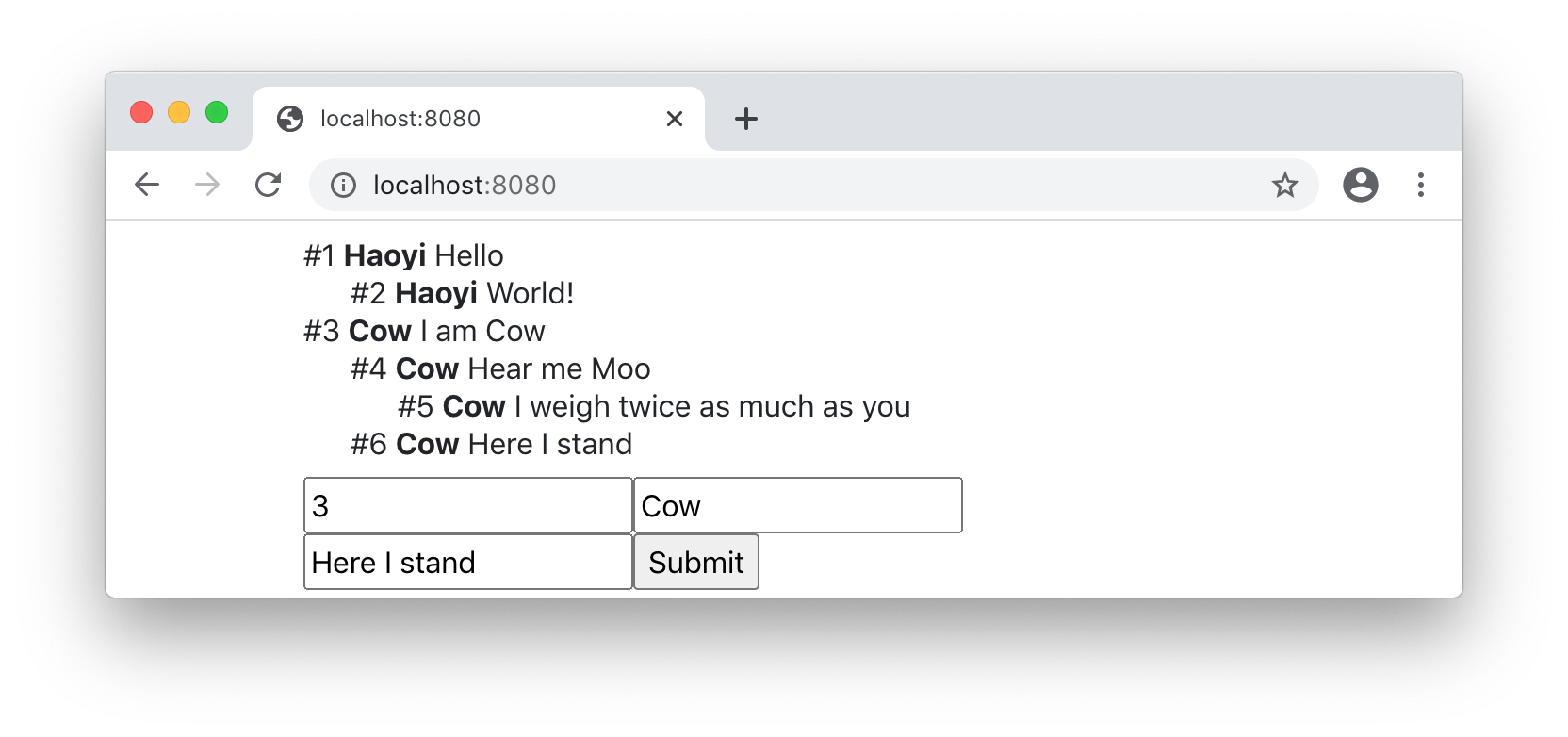
See example 15.4 - WebsiteTimestampsExercise: Add the ability to reply directly to existing chat messages, by giving each
message a unique id and adding another optional input field for user to
specify which message they are replying to. Replies should be indented under
the message they are replying to, nested arbitrarily deeply to form a
tree-shaped "threaded" discussion.
As a convenience, you can define your id column in the database as the
Postgres serial type, making it a 32-bit value that's automatically
incremented by the database when a row is inserted with the other columns
specified explicitly but with serial column elided:
Message.insert.columns(_.parent := p, _.name := n, _.msg := m)
Exercise: One limitation of the current push-update mechanism is that it can only push
updates to browsers connected to the same webserver. Make use of Postgres's
LISTEN/NOTIFY feature to push updates to all servers connected to the same
database, allowing the servers to be horizontally scalable and easily
replaceable. You can use the "Asynchronous Notifications" functionality in the
com.impossibl.pgjdbc-ng:pgjdbc-ng:0.8.4 package to register callbacks on
these events.
LISTEN/NOTIFY: https://www.postgresql.org/docs/current/sql-notify.htmlpgjdbc-ng: http://impossibl.github.io/pgjdbc-ng/docs/current/user-guide