12
Working with HTTP APIs
| 12.1 The Task: Github Issue Migrator | 223 |
| 12.2 Creating Issues and Comments | 225 |
| 12.3 Fetching Issues and Comments | 227 |
| 12.4 Migrating Issues and Comments | 232 |
> requests.post(
"https://api.github.com/repos/lihaoyi/test/issues",
data = ujson.Obj("title" -> "hello"),
headers = Map("Authorization" -> s"token $token")
)
res2: requests.Response = Response(
url = "https://api.github.com/repos/lihaoyi/test/issues",
statusCode = 201,
statusMessage = "Created",
...
Snippet 12.1: interacting with Github's HTTP API from the Scala REPL
HTTP APIs have become the standard for any organization that wants to let external developers integrate with their systems. This chapter will walk you through how to access HTTP APIs in Scala, building up to a simple use case: migrating Github issues from one repository to another using Github's public API.
We will build upon techniques learned in this chapter in Chapter 13: Fork-Join Parallelism with Futures, where we will be writing a parallel web crawler using the Wikipedia JSON API to walk the graph of articles and the links between them.
The easiest way to work with HTTP JSON APIs is through the Requests-Scala library for HTTP, and uJson for JSON processing. Both libraries are automatically included with Mill when launching the Scala REPL, which we will use throughout this chapter. Chapter 8: JSON and Binary Data Serialization covers in detail how to use the uJson library for parsing, modifying, querying and generating JSON data. The only new library we need for this chapter is Requests-Scala:
$ ./mill repl

> val r = requests.get("https://api.github.com/users/lihaoyi")
r: requests.Response = Response(...)

> r.statusCode
res0: Int = 200

> r.headers("content-type")
res1: Seq[String] = List("application/json; charset=utf-8")

> r.text()
res2: String = "{\"login\":\"lihaoyi\",\"id\":934140,\"node_id\":\"MDQ6VX..."
12.2.scala
Requests-Scala exposes the requests.* functions to make HTTP requests to a
URL. Above we see the usage of requests.get to make a GET request, but we also
have requests.post, requests.put, and many other methods each one
corresponding to a kind of HTTP action:
val r = requests.post("http://httpbin.org/post", data = Map("key" -> "value"))
val r = requests.put("http://httpbin.org/put", data = Map("key" -> "value"))
val r = requests.delete("http://httpbin.org/delete")
val r = requests.options("http://httpbin.org/get")
The Requests-Scala documentation will have more details on how it can be used: uploading different kinds of data, setting headers, managing cookies, and so on. For now let us get on with our task, and we will learn the various features when they become necessary.
12.1 The Task: Github Issue Migrator
Our project for this chapter is to migrate a set of Github Issues from one
repository to another. While Github easily lets you pull the source code history
using git pull and push it to a new repository using git push, the issues
are not so easy to move over.
There are a number of reasons why we may want to migrate our issues between repositories:
-
Perhaps the original repository owner has gone missing, and the community wants to move development onto a new repository.
-
Perhaps we wish to change platforms entirely: when Github became popular many people migrated their issue tracker history to Github from places like JIRA or Bitbucket, and we may want to migrate our issues elsewhere in future.
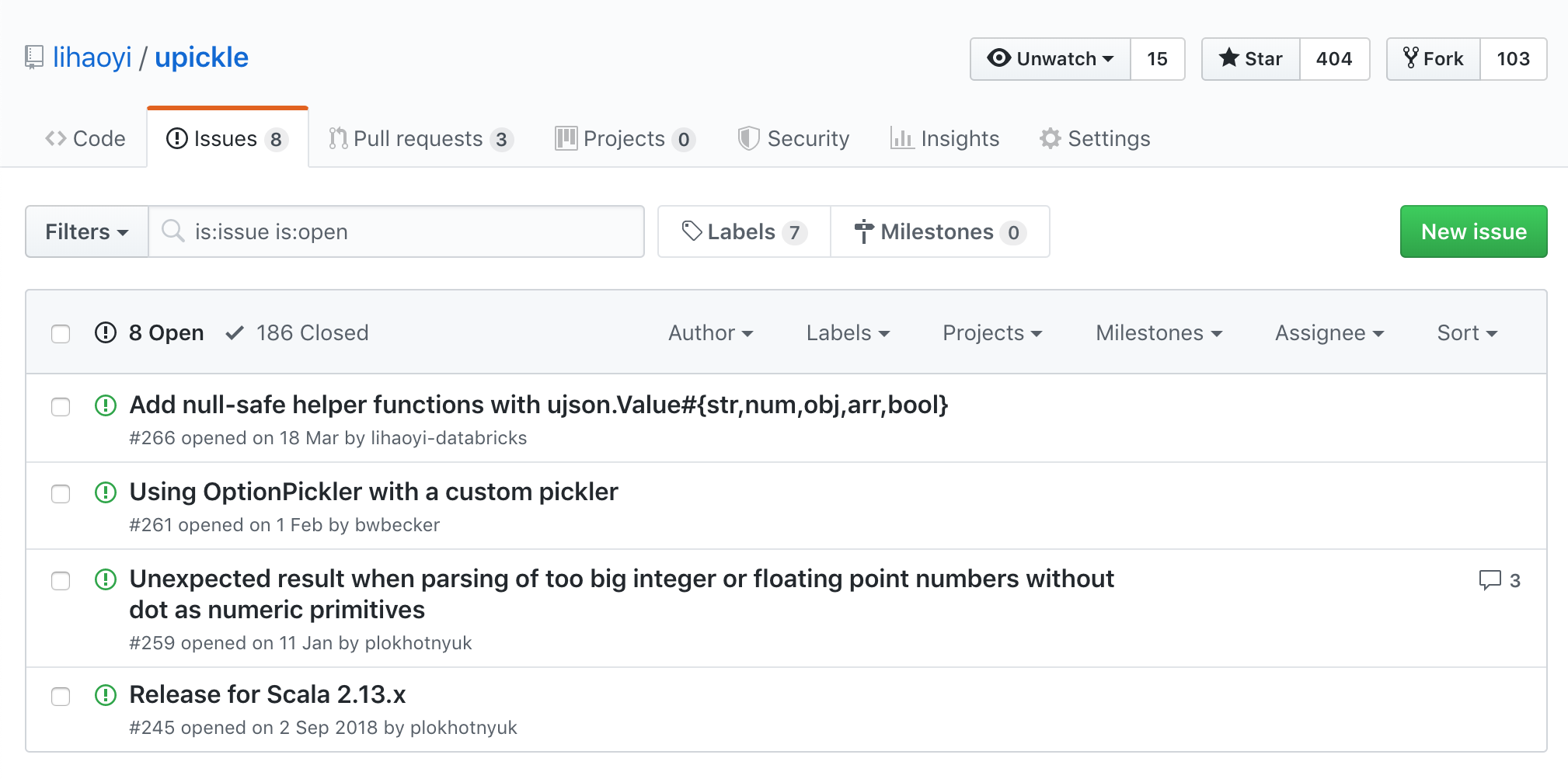
For now, let us stick with a simple case: we want to perform a one-off, one-way migration of Github issues from one existing Github repo to another, brand new one:
12.1.1 Old Existing Repository
12.1.2 Brand New Repository
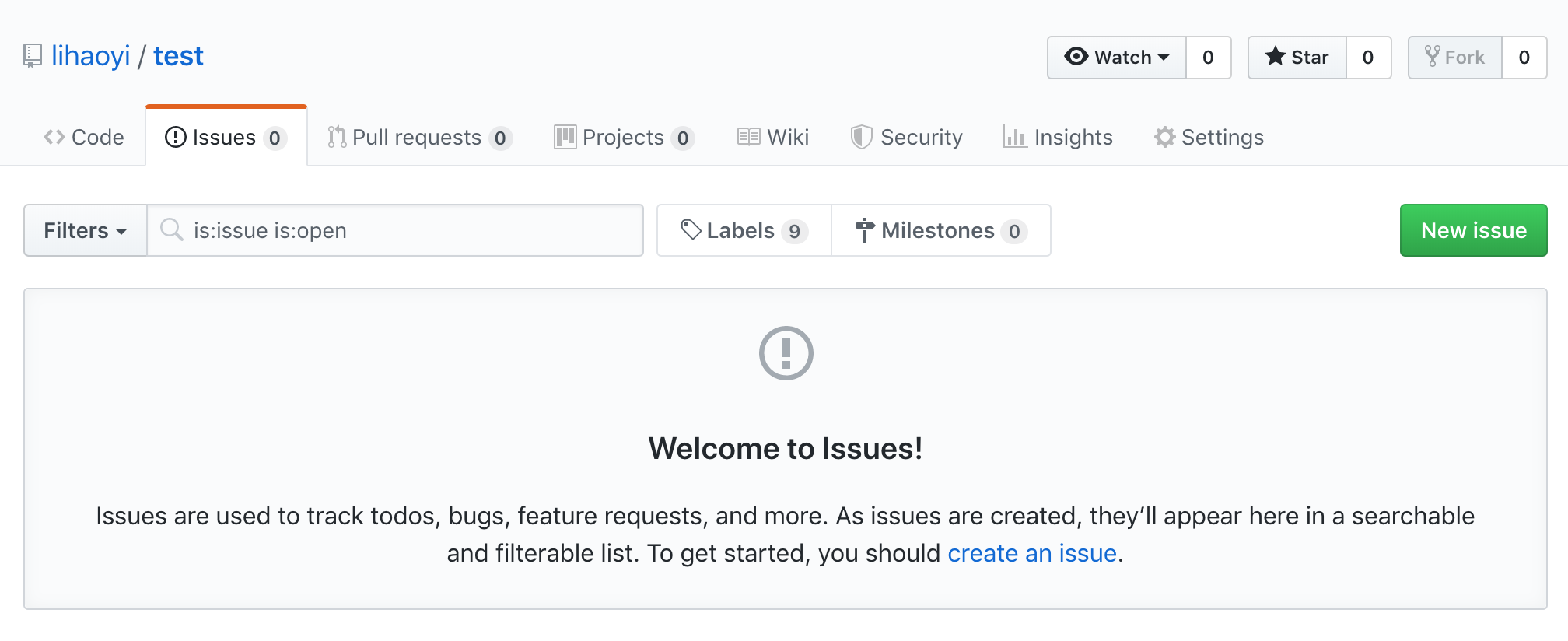
If you are going to run through this exercise on a real repository, make your new repository Private so you can work without worrying about other Github users interacting with it.
To limit the scope of the chapter, we will only be migrating over issues and comments, without consideration for other metadata like open/closed status, milestones, labels, and so on. Extending the migration code to handle those cases is left as an exercise to the reader.
We need to get an access token that gives our code read/write access to Github's data on our own repositories. The easiest way for a one-off project like this is to use a Personal Access Token, that you can create at:
Make sure you tick "Access public repositories" when you create your token:
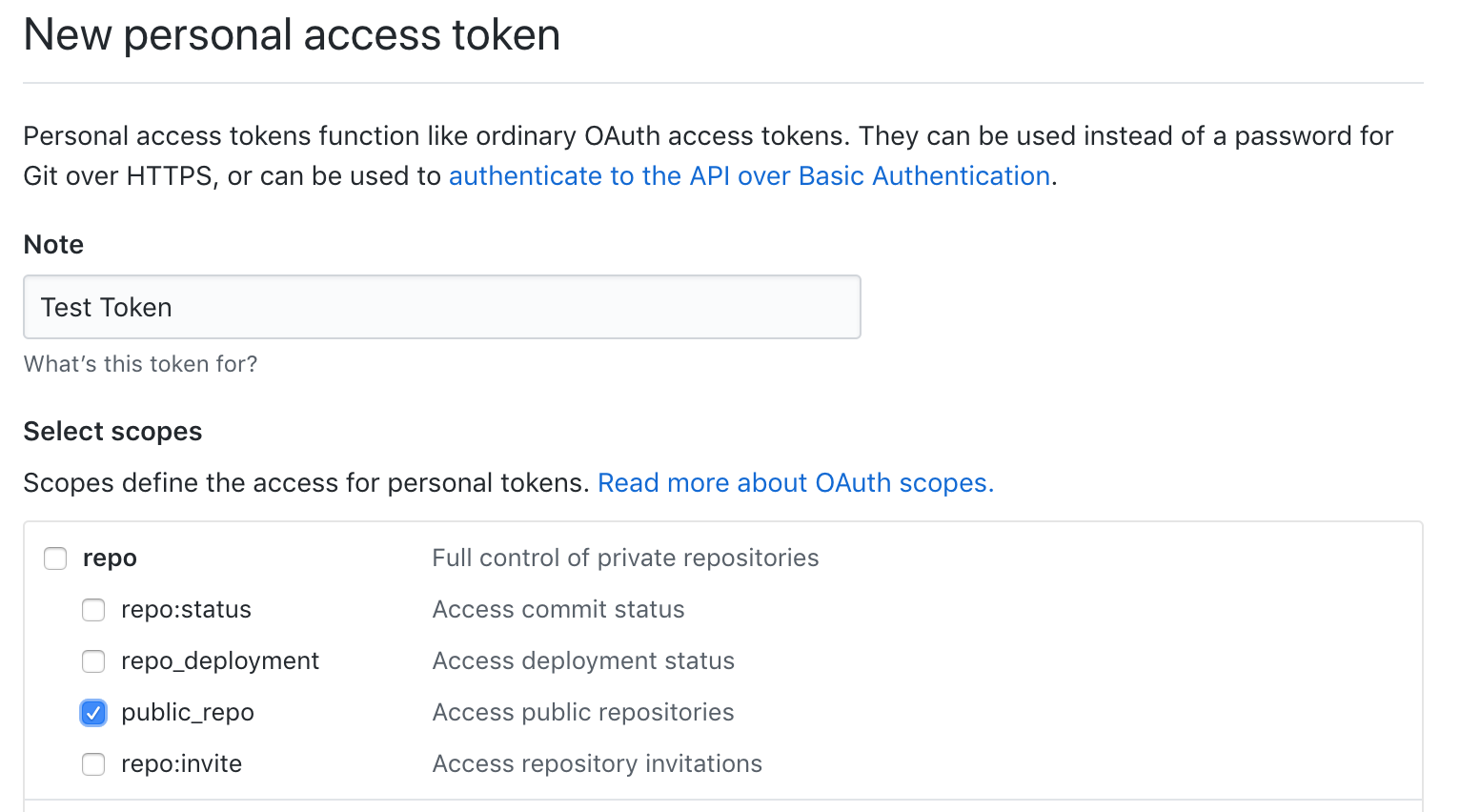
Once the token is generated, make sure you save the token to a file on disk, as you will not be able to retrieve it from the Github website later on. You can then read it into the Scala REPL for use:
> val token = os.read(os.home / "github_token.txt").trim() // drop whitespace
12.2 Creating Issues and Comments
To test out this new token, we can make a simple test request to the Create an Issue endpoint, which is documented here:
> requests.post(
"https://api.github.com/repos/lihaoyi/test/issues",
data = ujson.Obj("title" -> "hello"),
headers = Map("Authorization" -> s"token $token")
)
res2: requests.Response = Response(
url = "https://api.github.com/repos/lihaoyi/test/issues",
statusCode = 201,
statusMessage = "Created",
data = {"url":"https://api.github.com/repos/lihaoyi/test/issues/1", ...
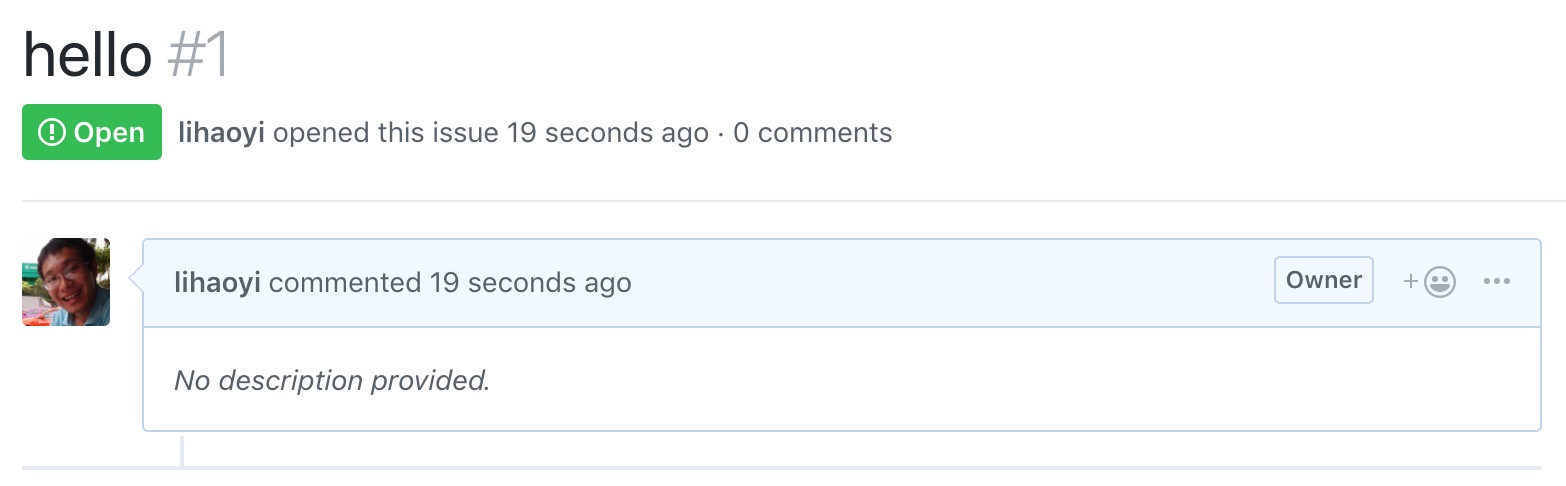
Our request contained a small JSON payload, ujson.Obj("title" -> "hello"),
which corresponds to the {"title": "hello"} JSON dictionary. Github responded
to this request with a HTTP 201 code, which indicates the request was successful.
Going to the issues page, we can see our new issue has been created:
We can also try creating a comment, using the Create a Comment endpoint, documented here:
> requests.post(
"https://api.github.com/repos/lihaoyi/test/issues/1/comments",
data = ujson.Obj("body" -> "world"),
headers = Map("Authorization" -> s"token $token")
)
res3: requests.Response = Response(
url = "https://api.github.com/repos/lihaoyi/test/issues/1/comments",
statusCode = 201,
statusMessage = "Created",
data = {"url":"https://.../repos/lihaoyi/test/issues/comments/573959489", ...
We can then open up the issue in the UI to see that the comment has been created:

12.3 Fetching Issues and Comments
For fetching issues, Github provides a public HTTP JSON API:
- REST API V3: List Issues for a Repository
- https://developer.github.com/v3/issues/#list-issues-for-a-repository
This tells us that we can make a HTTP request in the following format:
GET /repos/:owner/:repo/issues
Many parameters can be passed in to filter the returned collection: by
milestone, state, assignee, creator, mentioned, labels, etc. For now
we just want to get a list of all issues for us to migrate to the new
repository. We can set state=all to fetch all issues both open and closed. The
documentation tells us that we can expect a JSON response in the following
format:
[
{
"id": 1,
"number": 1347,
"state": "open",
"title": "Found a bug",
"body": "I'm having a problem with this.",
"user": { "login": "octocat", "id": 1 },
"labels": [],
"assignee": { "login": "octocat", "id": 1 },
"assignees": [],
"milestone": { ... },
"locked": true
}
]
This snippet is simplified, with many fields omitted for brevity. Nevertheless,
this gives us a good idea of what we can expect: each issue has an ID, a state,
a title, a body, and other metadata: creator, labels, assignees, milestone, and
so on. To access this data programmatically, we can use Requests-Scala to make a
HTTP GET request to this API endpoint to fetch data on the com-lihaoyi/upickle
repository, and see the JSON string returned by the endpoint:
> val resp = requests.get(
"https://api.github.com/repos/com-lihaoyi/upickle/issues",
params = Map("state" -> "all"),
headers = Map("Authorization" -> s"token $token")
)
resp: requests.Response = Response(
url = "https://api.github.com/repos/com-lihaoyi/upickle/issues",
statusCode = 200,
statusMessage = "OK",
data = [{"url":"https://api.github.com/repos/com-lihaoyi/upickle/issues/687",...
> resp.text()
res4: String = "[{\"url\":\"https://.../com-lihaoyi/upickle/issues/620\"..."
It is straightforward to parse this string into a JSON structure using the
ujson.read method we saw in Chapter 8: JSON and Binary Data Serialization.
This lets us easily traverse the structure, or pretty-print it in a reasonable
way:
> val parsed = ujson.read(resp)
parsed: ujson.Value.Value = Arr(
ArrayBuffer(
Obj(
Map(
"url" -> Str("https://api.github.com/.../com-lihaoyi/upickle/issues/687"),
"repository_url" -> Str("https://api.github.com/.../com-lihaoyi/upickle"),
...
> println(parsed.render(indent = 4))
[
{
"id": 3454385379,
"number": 687,
"title": "chore: Override size method in LinkedHashMap",
"user": {
"login": "<username elided>",
"id": 501740,
...
We now have the raw JSON data from Github in a reasonable format that we can work with. Next we will analyze the data and extract the bits of information we care about.
12.3.1 Pagination
The first thing to notice is that the returned issues collection is only 30 items long:
> parsed.arr.length
res5: Int = 30
This seems incomplete, since we earlier saw that the com-lihaoyi/upickle
repository has 8 open issues and 186 closed issues. On a closer reading of the
documentation, we find out that this 30-item cutoff is due to
pagination:
The relevant line is as follows:
Requests that return multiple items will be paginated to 30 items by default. You can specify further pages with the ?page parameter.
In order to fetch all the items, we have to pass a ?page parameter to fetch
subsequent pages: ?page=1, ?page=2, ?page=3, stopping when there are no
more pages to fetch. We can do that with a simple while loop, passing in
page in the request params:
> def fetchPaginated(url: String, params: (String, String)*) =
var done = false
var page = 1
val responses = collection.mutable.Buffer.empty[ujson.Value]
while !done do
println("page " + page + "...")
val resp = requests.get(
url,
params = Map("page" -> page.toString) ++ params,
headers = Map("Authorization" -> s"token $token")
)
val parsed = ujson.read(resp).arr
if parsed.length == 0 then done = true
else responses.appendAll(parsed)
page += 1
responses
> val issues = fetchPaginated(
"https://api.github.com/repos/com-lihaoyi/upickle/issues",
"state" -> "all"
)
page 1...
page 2...
page 3...
Here, we parse each JSON response, cast it to a JSON array via .arr, and then
check if the array has issues. If the array is not empty, we append all those
issues to a responses buffer. If the array is empty, that means we're done.
Note that by making fetchPaginated's take params as a variable argument list
of tuples, that allows us to call fetchPaginated with the same "key" -> "value" syntax that we use for constructing Maps via Map("key" -> "values"). "key" -> "value" is a shorthand syntax for a tuple ("key", "value"). Making fetchPaginated take (String, String)* lets us pass in an
arbitrary number of key-value tuples to fetchPaginated without needing to
manually wrap them in a Seq.
We can verify that we got all the issues we want by running:
> issues.length
res6: Int = 272
This matches what we would expect, with 8 open issues, 186 closed issues, 3 open pull requests, and 75 closed pull requests adding up to 272 issues in total.
12.3.2 Picking the data we want
Github by default treats issues and pull requests pretty similarly, but for the purpose of this exercise, let us assume we only want to migrate the issues. We'll also assume we don't need all the information on each issue: just the title, description, original author, and the text/author of each of the comments.
Looking through the JSON manually, we see that the JSON objects with the
pull_request key represent pull requests, while those without represent
issues. Since for now we only want to focus on issues, we can filter out the
pull requests:
> val nonPullRequests = issues.filter(!_.obj.contains("pull_request"))
> nonPullRequests.length
res7: Int = 303
For each issue, we can pick out the number, title, body, and author from the
ujson.Value using the issue("...") syntax:
> val issueData = for issue <- nonPullRequests yield (
issue("number").num.toInt,
issue("title").str,
issue("body").strOpt.getOrElse(""),
issue("user")("login").str
)
issueData: mutable.Buffer[(Int, String, String, String)] =
ArrayBuffer(
(
685,
"Maybe performance optimization for upickle.core.LinkedHashMap",
"""Motivation:
The current implementation of `upickle.core.LinkedHashMap` makes use of..."""
...
Now, we have the metadata around each top-level issue. However, one piece of information is still missing, and doesn't seem to appear at all in these responses: where are the issue comments?
12.3.3 Issue Comments
It turns out that Github has a separate HTTP JSON API endpoint for fetching the comments of an issue:
- REST API V3: List comments in a repository
- https://developer.github.com/v3/issues/comments/#list-comments-in-a-repository
Since there may be more than 30 comments, we need to paginate through the
list-comments endpoint the same way we paginated through the list-issues
endpoint. The endpoints are similar enough we can re-use the fetchPaginated
function we defined earlier:
> val comments = fetchPaginated(
"https://api.github.com/repos/com-lihaoyi/upickle/issues/comments"
)
> println(comments(0).render(indent = 4))
{
"url": "https://api.github.com/repos/com-lihaoyi/upickle/issues/comments/46443901",
"html_url": "https://github.com/com-lihaoyi/upickle/issues/1#issuecomment-46443901",
"issue_url": "https://api.github.com/repos/com-lihaoyi/upickle/issues/1",
"id": 46443901,
"user": { "login": "lihaoyi", ... },
"created_at": "2014-06-18T14:38:49Z",
"updated_at": "2014-06-18T14:38:49Z",
"author_association": "OWNER",
"body": "Oops, fixed it in trunk, so it'll be fixed next time I publish\n"
}
From this data, it's quite easy to extract the issue each comment is tied to, along with the author and body text:
> val commentData = for comment <- comments yield (
comment("issue_url").str match {
case s"https://api.github.com/repos/$repo/issues/$id"=> id.toInt
},
comment("user")("login").str,
comment("body").str
)
commentData: mutable.Buffer[(Int, String, String)] =
ArrayBuffer(
(1, "lihaoyi", "Oops, fixed it in trunk, so it'll be fixed next time I publish"),
(2, "lihaoyi", "Was a mistake, just published it, will show up on maven..."),
...
Note that in both commentData and issueData, we are manually extracting the
fields we want from the JSON and constructing a collection of tuples
representing the data we want. If the number of fields grows and the tuples get
inconvenient to work with, it might be worth defining a case class
representing the records and de-serializing to a collection of case class
instances instead.
12.4 Migrating Issues and Comments
Now that we've got all the data from the old repository com-lihaoyi/upickle, and
have the ability to post issues and comments to the new repository
lihaoyi/test, it's time to do the migration!
We want:
-
One new issue per old issue, with the same title and description, with the old issue's Author and ID as part of the new issue's description
-
One new comment per old comment, with the same body, and the old comment's author included.
12.4.1 One new issue per old issue
Creating a new issue per old issue is simple:
- Sort the
issueDatawe accumulated earlier - Loop over the issues in sorted order
- Call the create-issue endpoint once per issue we want to create with the
relevant
titleandbody
> val issueNums =
for (number, title, body, user) <- issueData.sortBy(_(0)) yield
println(s"Creating issue $number")
val resp = requests.post(
s"https://api.github.com/repos/lihaoyi/test/issues",
data = ujson.Obj(
"title" -> title,
"body" -> s"$body\nID: $number\nOriginal Author: $user"),
headers = Map("Authorization" -> s"token $token")
)
val newIssueNumber = ujson.read(resp)("number").num.toInt
(number, newIssueNumber)
Creating issue 1
Creating issue 2
...
Creating issue 106
Note: please be aware of potential rate limiting when using the GitHub API. This creates all the issues we want:
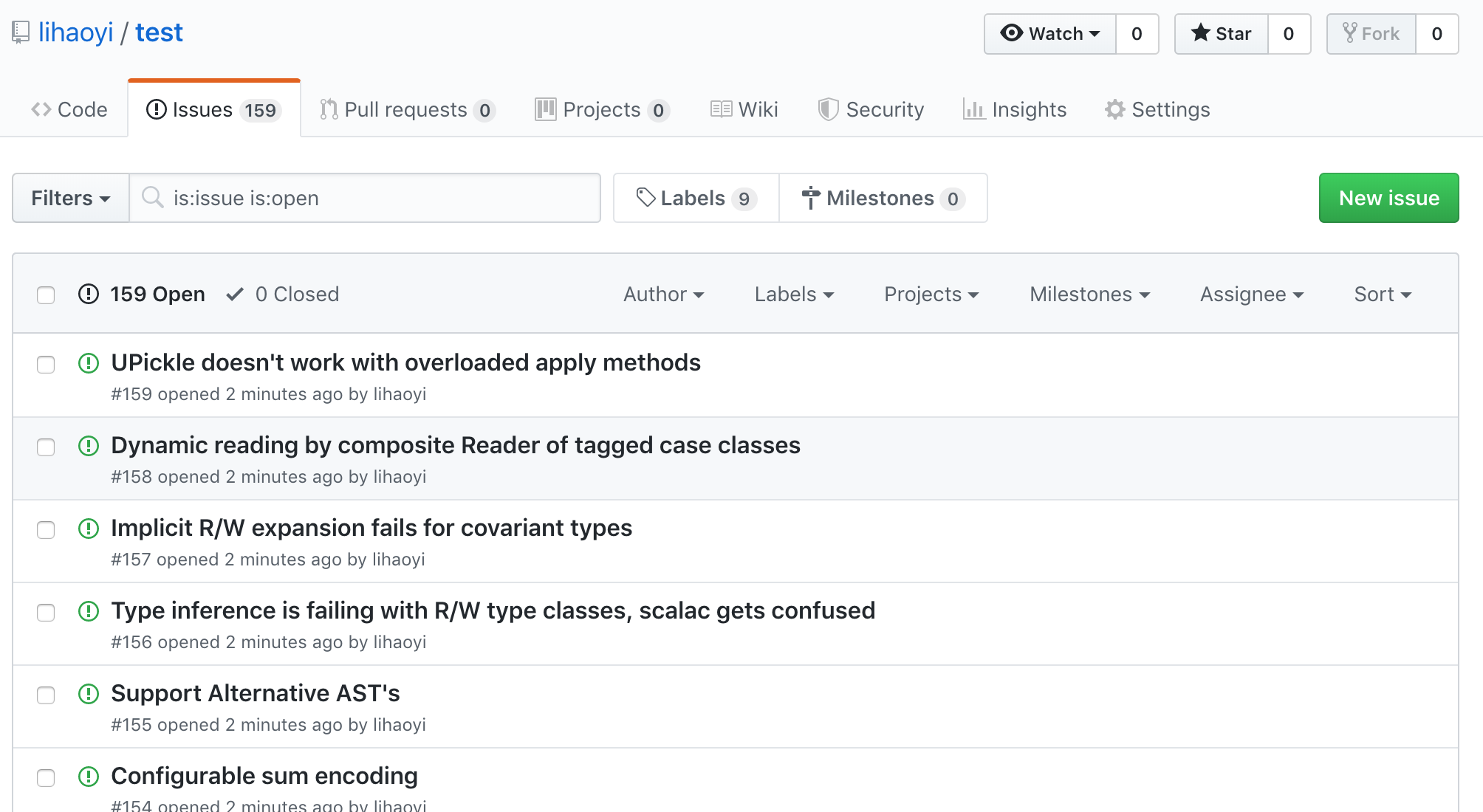
Note that we store the newIssueNum of each newly created issue, along with the
number of the original issue. This will let us easily find the corresponding
new issue for each old issue, and vice versa.
12.4.2 One new comment per old comment
Creating comments is similar: we loop over all the old comments and post a new
comment to the relevant issue. We can use the issueNums we stored earlier to
compute an issueNumMap for easy lookup:
> val issueNumMap = issueNums.toMap
issueNumMap: Map[Int, Int] = Map(
101 -> 118,
88 -> 127,
170 -> 66,
...
This map lets us easily look up what the new issue number is for each of the old issues, so we can make sure the comments on each old issue get attached to the correct new issue. We can manually inspect the two repositories' issues to verify that the title of each issue is the same for each pair of indices into the old and new repository's issue tracker.
Using issueNumMap, we can then loop over the comments on the old repository's
issues and use requests.post to create comments on the new repository's
issues:
> for
(issueId, user, body) <- commentData
newIssueId <- issueNumMap.get(issueId)
do
println(s"Commenting on issue old_id=$issueId new_id=$newIssueId")
val resp = requests.post(
s"https://api.github.com/repos/lihaoyi/test/issues/$newIssueId/comments",
data = ujson.Obj("body" -> s"$body\nOriginal Author:$user"),
headers = Map("Authorization" -> s"token $token")
)
Commenting on issue old_id=1 new_id=1
Commenting on issue old_id=2 new_id=2
...
Commenting on issue old_id=272 new_id=194
Now, we can see that all our issues have been populated with their respective comments:
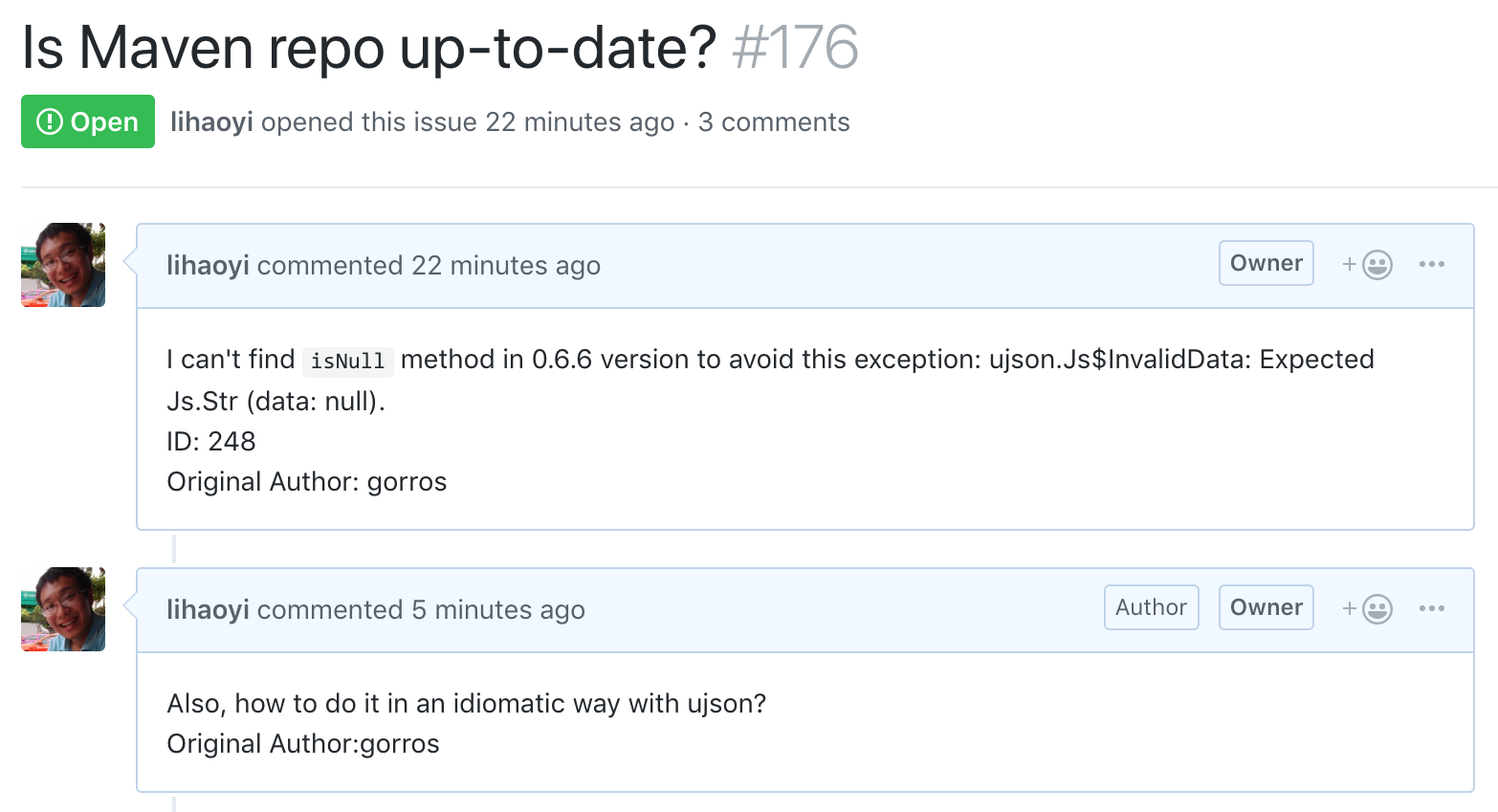
And we're done! All issues from the old repository have been migrated over to the new repository, and all comments on those issues have been migrated as well. The issue migrator we have walked through here is deliberately simplified: we only migrate issues, do not handle open/closed status or other metadata, and do not migrate pull requests. Extending the issue migrator to handle those is left as an exercise for the reader.
To wrap up, here's all the code for our Github Issue Migrator, wrapped in a
def main method to allow it to be called via the command line as scala IssueMigrator.scala -- com-lihaoyi/pprint lihaoyi/test.
IssueMigrator.scala12.19.scaladefmain(srcRepo:String,destRepo:String)=valtoken=os.read(os.home/"github_token.txt").trimvarsecondaryRateLimitHits=0defcheckLimit()=secondaryRateLimitHits+=1ifsecondaryRateLimitHits%15==0thenprintln("Sleeping for 10 seconds to avoid secondary rate limits...")Thread.sleep(10000)deffetchPaginated(url:String,params:(String,String)*)=vardone=falsevarpage=1valresponses=collection.mutable.Buffer.empty[ujson.Value]while!donedoprintln("page "+page+"...")checkLimit()valresp=requests.get(url,params=Map("page"->page.toString)++params,headers=Map("Authorization"->s"token$token"))valparsed=ujson.read(resp).arrifparsed.length==0thendone=trueelseresponses.appendAll(parsed)page+=1responsesvalissues=fetchPaginated(s"https://api.github.com/repos/$srcRepo/issues","state"->"all")valnonPullRequests=issues.filter(!_.obj.contains("pull_request"))valissueData=forissue<-nonPullRequestsyield(issue("number").num.toInt,issue("title").str,issue("body").strOpt.getOrElse(""),issue("user")("login").str)valcomments=fetchPaginated(s"https://api.github.com/repos/$srcRepo/issues/comments")valcommentData=forcomment<-commentsyield(comment("issue_url").strmatch{cases"https://api.github.com/repos/$repo/issues/$id"=>id.toInt},comment("user")("login").str,comment("body").str)valissueNums=for(number,title,body,user)<-issueData.sortBy(_(0))yieldprintln(s"Creating issue$number")checkLimit()valresp=requests.post(s"https://api.github.com/repos/$destRepo/issues",data=ujson.Obj("title"->title,"body"->s"$body\nID:$number\nOriginal Author:$user"),headers=Map("Authorization"->s"token$token"))println(resp.statusCode)valnewIssueNumber=ujson.read(resp)("number").num.toInt(number,newIssueNumber)valissueNumMap=issueNums.toMapfor(issueId,user,body)<-commentData newIssueId<-issueNumMap.get(issueId)doprintln(s"Commenting on issue old_id=$issueIdnew_id=$newIssueId")checkLimit()valresp=requests.post(s"https://api.github.com/repos/$destRepo/issues/$newIssueId/comments",data=ujson.Obj("body"->s"$body\nOriginal Author:$user"),headers=Map("Authorization"->s"token$token"))println(resp.statusCode)
12.5 Conclusion
This chapter has gone through how to use requests.get to access data you need
from a third party service, ujson to manipulate the JSON payloads, and
requests.post to send commands back up. Note that the techniques covered in
this chapter only work with third party services which expose HTTP JSON APIs
that are designed for programmatic use.
ujson and requests can be used in projects built with Mill or other build
tools via the following coordinates:
Mill12.20.scalamvn"com.lihaoyi::ujson:4.4.2"mvn"com.lihaoyi::requests:0.9.0"
The documentation for Requests-Scala has more detail, if you wish to dive deeper into the library:
While we will be using Requests-Scala throughout this book, the Scala ecosystem has several alternate HTTP clients you may encounter in the wild. The syntax for each library will differ, but the concepts involved in all of them are similar:
- STTP: https://github.com/softwaremill/sttp
- Akka HTTP: https://github.com/akka/akka-http
- HTTP4S: https://github.com/http4s/http4s
- AsyncHttpClient: https://github.com/AsyncHttpClient/async-http-client
We will re-visit Requests-Scala in Chapter 13: Fork-Join Parallelism with Futures, where we will use it along with AsyncHttpClient to recursively crawl the graph of Wikipedia articles.
Exercise: Make the issue migrator add a link in every new issue's description back to the old github issue that it was created from.
See example 12.2 - IssueMigratorLinkExercise: Migrate the open-closed status of each issue, such that the new issues are automatically closed if the old issue was closed.
See example 12.3 - IssueMigratorClosed